Choose which session types record audio
Last updated: October 21, 2026
Your clinic can decide, one service at a time, whether sessions record audio or are text-only. That includes 97155 protocol modification and 97153 direct treatment, which used to be text-only for every clinic. If your clinic wants BCBA supervision sessions recorded so Alpaca can draft the note from the audio, you can turn that on for 97155 alone and leave everything else as it is.
The setting makes three promises:
One switch per service. Turning recording on for 97155 does not touch 97153 or any other code.
The setting is enforced when the session starts, not only shown on screen. A session for a text-only service starts text-only, whatever the provider's device sends.
97153 and 97155 stay text-only unless you turn them on. No clinic starts recording supervision or direct sessions without an admin choosing it.
Who can change it
The Session audio recording card is under My Organization > Clinical. You see it and can edit it when:
your role is Admin or Assistant Admin in that organization; and
you are working in that organization (switch organizations first if you belong to more than one).
Clinicians, RBTs, and other roles do not see the card. Recording is a clinic-wide policy that decides what audio is captured during sessions with families, so the decision belongs to the clinic's administrators rather than to each provider.
How recording works before you change anything
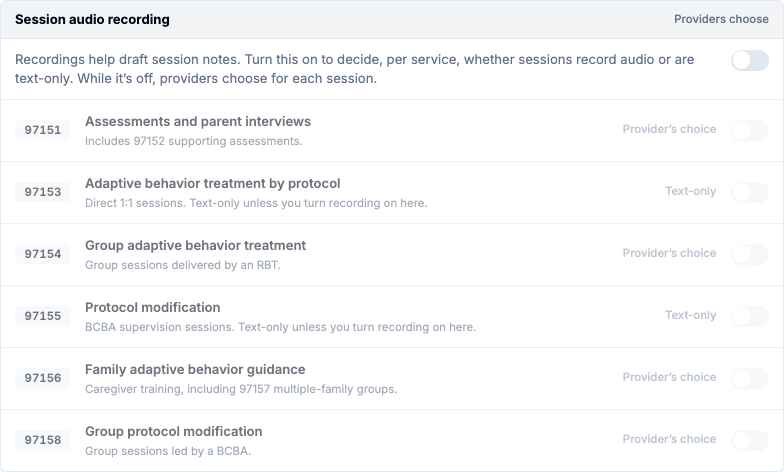
Until an admin turns on Clinic sets recording per service, the card's header reads Providers choose and every row is greyed out:
97153 and 97155 are Text-only. Sessions for these codes never record audio.
97151, 97154, 97156, and 97158 read Provider's choice. The provider decides for each session.
The service switches cannot be changed in this state, because the clinic is not yet making the decision.
Turn on recording for 97155
Open My Organization and select Clinical in the settings list.
In Session audio recording, turn on Clinic sets recording per service.
Read every row before you go further. See Read this before you save below.
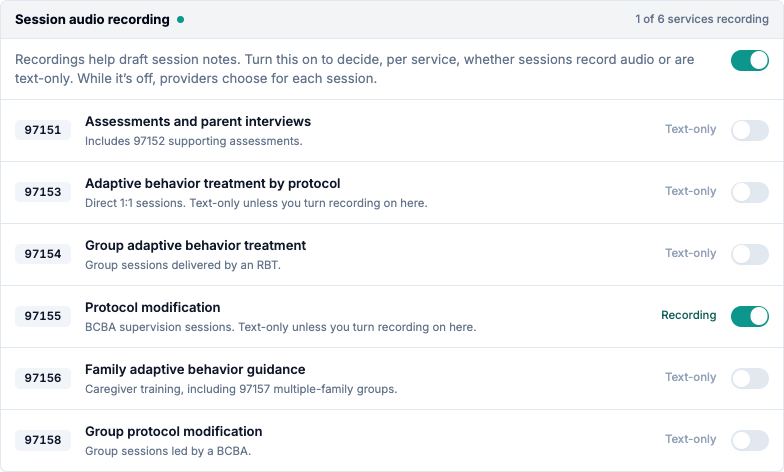
Turn on Record audio for 97155. The row changes to Recording and the header counts the services that record, for example 1 of 6 services recording.
Turn on any other service that should also record.
Select Save changes at the bottom of the page.
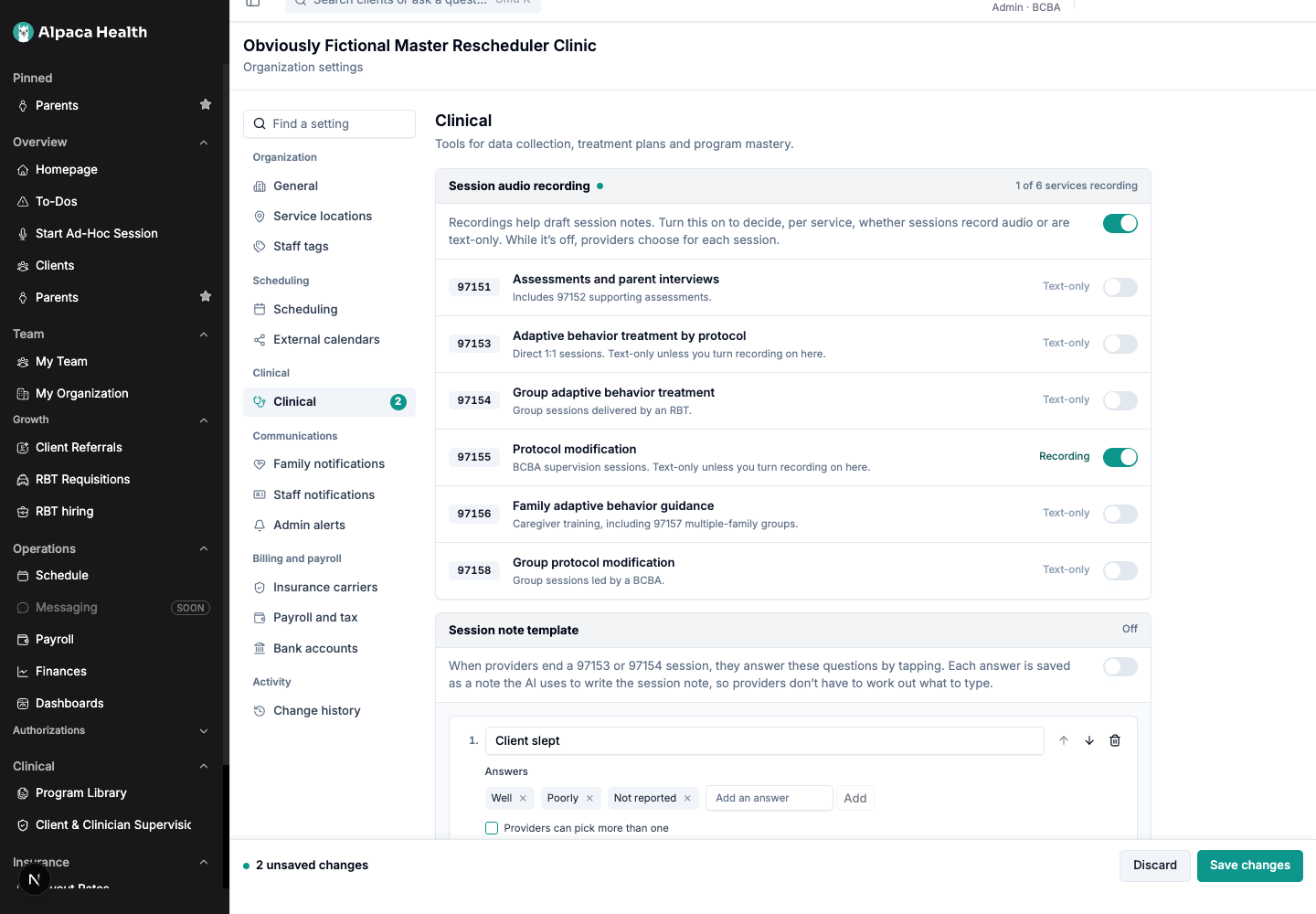
Nothing is saved until you select Save changes. Until then the card shows a dot next to its title, the Clinical entry shows the number of changes, and the bar at the bottom reads, for example, 2 unsaved changes. Discard puts everything back the way it was saved.
What makes this safe
Read this before you save
Turning on Clinic sets recording per service makes every service text-only until you turn recording on for it. That includes the services that were Provider's choice a moment earlier.
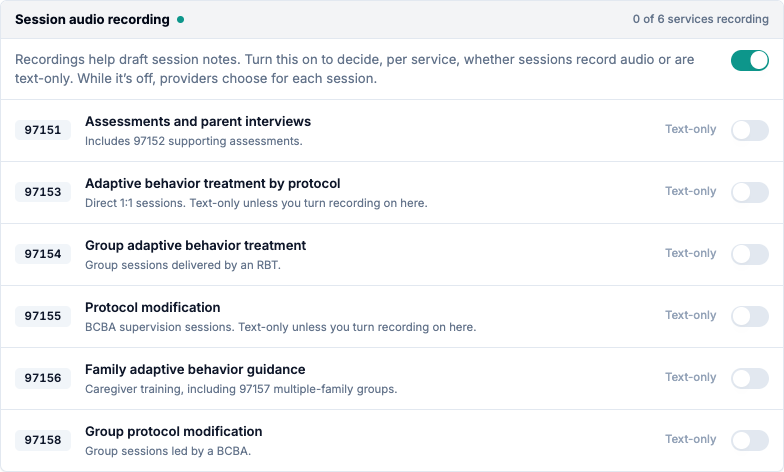
Recording stops for any service you leave off. If your providers record 97151 assessments or 97156 caregiver training today and you only want to add 97155, turn on 97151 and 97156 as well before you save.
One service at a time
Each row is a separate switch. Turning on Record audio for 97155 leaves Record audio for 97153 off. The two codes are often scheduled together, and a clinic that records BCBA supervision may still want RBT direct sessions text-only.
The rule is applied when a session starts
Alpaca applies your setting at the moment a provider starts a session. If a service is text-only, the session starts text-only, whatever the app on the provider's device asked for. The schedule and the session screens read the same setting, so providers are not offered a recording that would then be dropped.
A session that was already started keeps the mode it started with. Your change applies to sessions started after you save.
Every change is recorded
Saved changes appear in My Organization > Change history as Clinic sets recording per service and Session audio recording by service, with who made the change and when.
What it will not do
It will not set recording per provider or per client. The setting covers the whole organization, one service at a time.
It will not change a session that is already running. The mode is fixed when the session starts.
It will not turn recording on for 97153 or 97155 by itself. Those stay text-only until an admin turns on Clinic sets recording per service and that service's switch.
It does not cover every code. Only the six services on the card are controlled here. 97152 follows 97151, and 97157 follows 97156. Other codes, such as T1026, are not on the card and are not controlled by it.
Your data
The card stores two things for your organization: whether the clinic sets recording per service, and which services record.
Changing the setting does not delete, move, or re-process recordings or notes that already exist.
Sessions on a text-only service capture no audio. The provider writes the note.
Sessions on a recording service capture audio, which Alpaca uses to help draft the session note.
Recover from common problems
What you see | What it means | What to do |
|---|---|---|
Session audio recording is missing from Clinical | Your role cannot manage session audio recording, or you are in a different organization. | Switch to the right organization, or ask an Admin to make the change. |
Every service switch is greyed out and the header reads Providers choose | Clinic sets recording per service is off. | Turn it on to edit the service switches. |
Provider's choice became Text-only on several rows | Turning on Clinic sets recording per service makes every service text-only until you turn it on. | Turn recording back on for each service that should record, then select Save changes. |
No live audio recording on a 97155 appointment after you turned 97155 on | The change has not been saved, or the page was loaded before you saved. | Confirm the card shows Recording after a reload, then reload the schedule. |
A provider's session for a recording service did not record | The session was started before the change was saved. | Sessions started after the save will record. A started session keeps its mode. |
2 unsaved changes stays at the bottom of the page | The change has not been saved. | Select Save changes, or Discard to drop it. |
Current limitations
The setting is organization-wide. There is no per-provider, per-client, or per-payer recording rule.
Turning on Clinic sets recording per service removes Provider's choice entirely. You cannot leave some services to the provider and decide others.
The No live audio recording hint on the schedule appears only for 97153 and 97155. A different service you have made text-only does not show the hint on the schedule, although the session still starts text-only.
Only six services are on the card. T1026 and other codes are not controlled here.