How to Set Up Roth IRA (Savings) Contributions for Staff in Payroll (including CO Secure Savings)
Last updated: September 1, 2026
Option A: Alpaca-managed (CO Secure Savings only)
Add bao@alpacahealth.io as a member of your admin team and send support@alpacahealth.io an email once you are done
How to do that?
Log into CO Secure Savings portal from https://coloradosecuresavings.vestwell.com/
Navigate: Company -> Manage Admin Team -> Add Teammate -> add bao@alpacahealth.io
Option B: Self-managed
If you need to record and manage Roth IRA or other retirement savings contributions for your staff each payroll period, Alpaca Health's Payroll page includes a built-in Savings feature to help you do this.
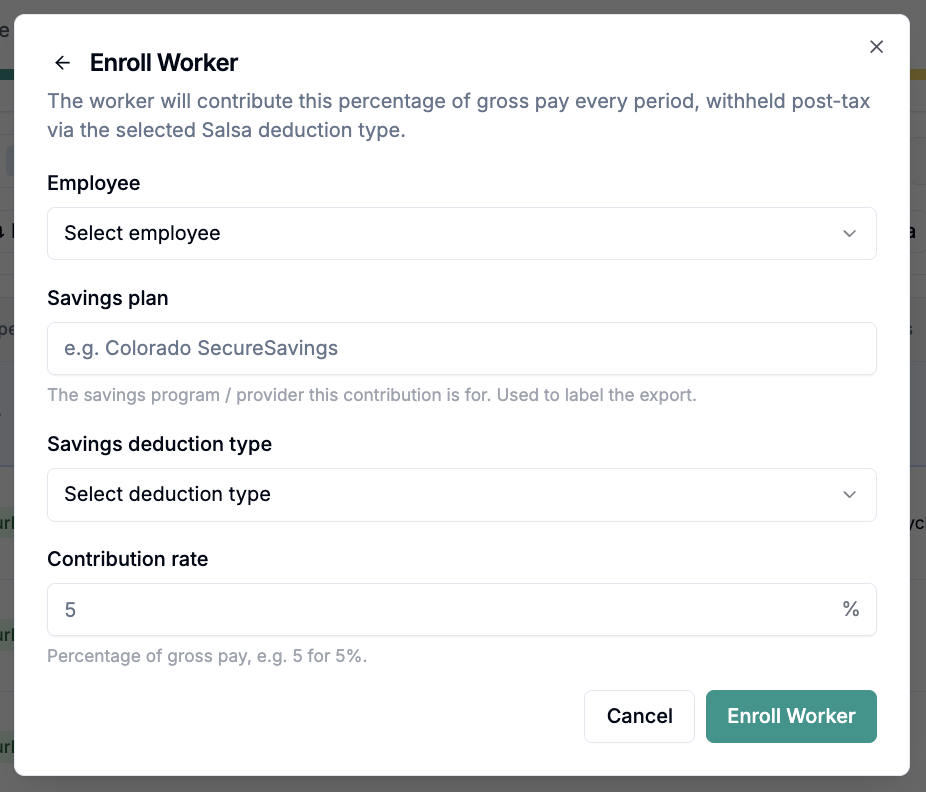
Adding Savings Contributions
Navigate to the Payroll page in Alpaca Health.
Locate the Savings section on the page.
Enter each employee's contribution data directly into the provided fields.

Exporting Savings Data
Once you have entered the contribution information, you can use the Export Savings option to download the data. You can then upload this exported file to your savings provider's website (e.g., Secure Savings) each payroll period.
Need Help Managing Contributions?
If you use Secure Savings and would prefer to have the Alpaca Health support team handle the uploads on your behalf, you can add a support team member as an admin on your Secure Savings account.
Contact our support team at support@alpacahealth.io for assistance and mention Roth IRA or Secure Savings Set up in your title.