Sign the Nevada Medicaid FA-11E form (BCBA and parent)
Last updated: November 11, 2026
Nevada Medicaid initial authorizations need the FA-11E form signed twice: first by the BCBA responsible for the request, then by the client’s parent or guardian. Alpaca completes the administrative fields in between.
Availability: This applies to initial authorizations for Nevada Medicaid. Only a BCBA can sign the clinical side.
Watch the walkthrough
Steps
1. BCBA: open Sign form
Open the request from Care Readiness. In the packet, NV FA-11E shows Missing, and Submit is disabled until the form is signed.
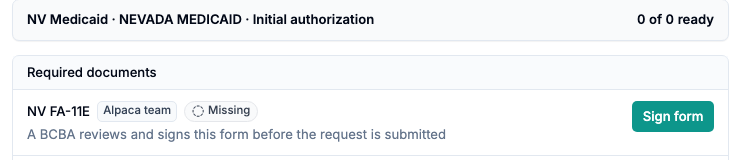
Select Sign form.
2. BCBA: review and sign
Read the form, tick the attestation, draw your signature, and select Sign.
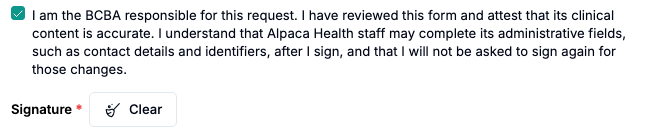
By signing, you attest that the clinical content is accurate. Alpaca staff may then complete administrative fields, such as contact details and identifiers, and you won’t be asked to sign again for those changes.
Sign as yourself. Signing is refused while you are acting as another user.
The row changes to Signed. Select Submit.
3. Parent: review and sign in the parent portal
In the Prior Authorizations Requests table, the request shows Awaiting Parent. The parent sees Medicaid prior authorization form in the checklist Needed for assessment and treatment.

They select Review and sign, read the form, and tick the confirmation.

They then type their printed name, draw a signature, and select Sign.
Result
When the parent signs, Alpaca submits the request to the payer automatically. The Packet column shows Submitted with the date, and the task leaves the parent’s to-do list.
Common problems
What you see | What to do |
|---|---|
Sign form isn’t available to you | Only a BCBA can sign. Ask the BCBA on the case. |
Signing is refused | Stop acting as another user, then sign again. |
Awaiting Parentfor several days | Ask the parent to open the parent portal and select Review and sign. If they can’t see the task, contact Alpaca support. |