The Expected Tax Notices tab
Last updated: August 25, 2026
Alpaca files and pays your payroll taxes for you, but it can only do that once each state has issued you an account number and granted Alpaca access to file on your behalf. The Expected Tax Notices tab is the checklist of everything still outstanding. This article explains what is on it, who owns each item, and what you actually have to do.
Finding the tab

The Payroll page tabs.
Go to Payroll and look for the Expected Tax Notices tab. It carries an amber badge with the number of items waiting on you.
The tab only appears when your organization actually has notices. If you do not see it, there is nothing outstanding — that is the good outcome, not a missing feature.
Outstanding items also surface in two other places: a Tax setup card in the Needs your attention strip on your homepage, and a banner at the top of the Payroll Details tab reading "Alpaca can't file your payroll taxes until N tax notices are resolved" with a progress bar.
The two kinds of notice
Type | What it means | What you do |
|---|---|---|
Verify Tax ID | A state has issued you an account number that Alpaca does not have on file — for example a Central Registration Number or a state unemployment insurance account number. | Enter the number. |
TPA Access | Alpaca needs third-party administrator access in the state's tax portal so it can file and pay on your behalf. | Sign in to the state portal and grant Alpaca access. |
Each notice is titled in plain language — for example Maryland Central Registration Number or Delaware unemployment insurance — and names the exact field you need, rather than an internal tax category you would not recognise.
Reading the statuses
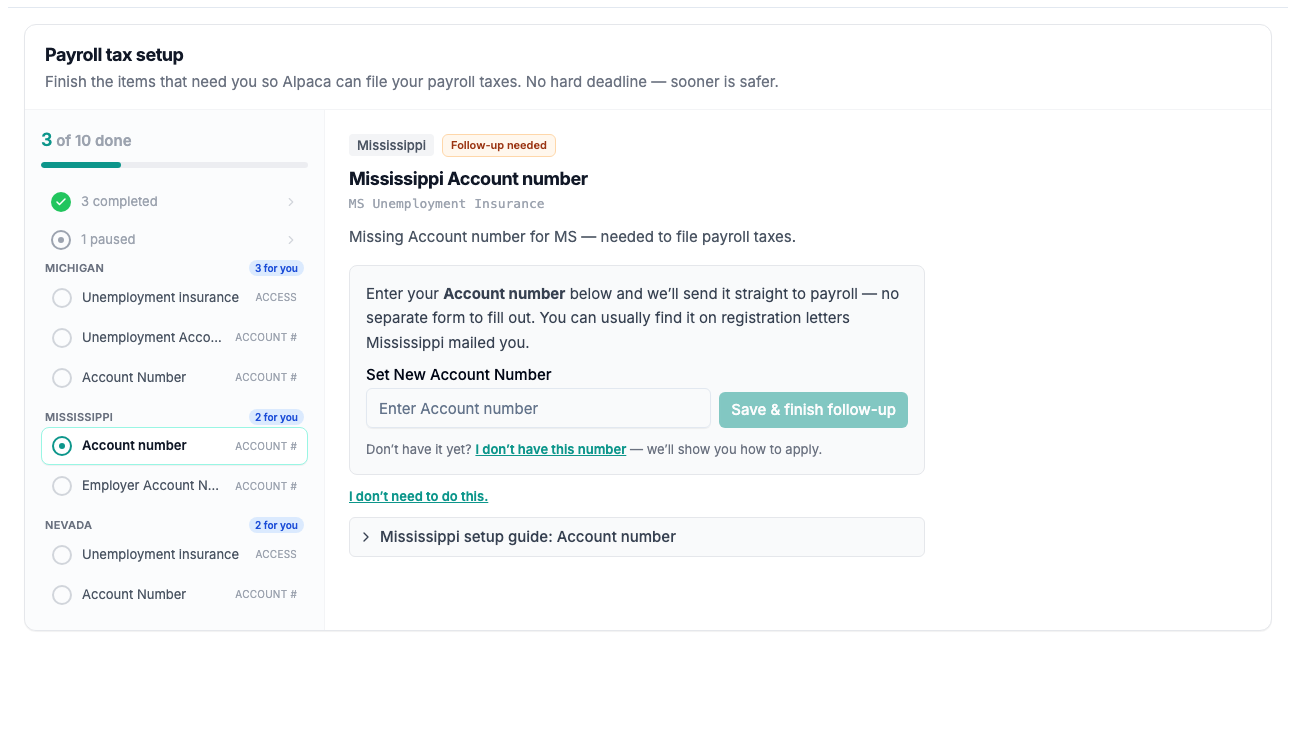
The Expected Tax Notices tab: progress rail grouped by state on the left, the selected notice and its single action on the right.
Status | Who owns it | Meaning |
|---|---|---|
Action Needed | Practice | Waiting on you. This is what the amber badge counts. |
Awaiting Practice | Practice | Same as above, but this item has come back to you after a first attempt. |
Awaiting Alpaca | Alpaca | Alpaca is working on it. Nothing for you to do. |
With Salsa | Alpaca | With Alpaca's payroll partner. Nothing for you to do. |
Paused | — | On hold. Alpaca will pick it back up if anything changes. |
Complete | — | Account number on file, or access confirmed. Alpaca handles the filing from here. |
The progress rail on the left of the tab shows every notice grouped by state, with states that need you sorted to the top. Selecting one shows its detail and its single action on the right.
Resolving a Verify Tax ID notice
Most of these can be resolved without leaving Alpaca: type the account number into the inline field and save. Alpaca writes it straight through to payroll and the notice resolves itself.
A few jurisdictions have no matching field to write into. Those send you to Go to Employer Profile instead — enter the number in the Tax info section there, then come back and click I've added it. Alpaca re-checks against the payroll system when you leave the profile tab, so a number you have just typed is picked up without waiting for the overnight sync.
Resolving a TPA Access notice
Click Open the state portal if a link is provided, or sign in to the state's tax portal yourself.
Confirm that Alpaca — your third-party administrator — has access to the account.
Come back to Alpaca and click I've confirmed access.
If you are not sure how to grant access in a particular state, notices that have instructions attached show a View setup instructions link. There is also a State Tax Guides tab on the Payroll page.
"I don't need to do this"
Occasionally a notice is genuinely not applicable — you have no W-2 employees in that state, for instance. Click I don't need to do this and give a reason. The notice is paused rather than deleted.
If you later start running W-2 payroll for workers in that jurisdiction, you will need that account number or access after all.
How urgent is this?
There is no hard deadline attached to a tax notice, and an unresolved notice does not stop your staff being paid. But Alpaca cannot file the associated tax until it is resolved, and some states take several days to process a registration or an access request — so sooner is genuinely safer than later.
The action log
Each notice keeps a timeline of what has happened to it: created, clinic submitted, marked finished, requested action, paused, resumed, passed to Salsa, tax ID detected. If you are unsure why something bounced back to you, that log is the place to look.
Still stuck? Email support@alpacahealth.io and we will take a look.