Prepare a Texas Medicaid extension or recertification
Last updated: October 28, 2026
When a client's Texas Medicaid authorization is running out, Texas asks for more than a treatment plan. Before it approves more hours, it wants to see that the child (and the parent) actually used the hours already approved, how the child is progressing, and that a physician agrees. Alpaca builds that paperwork for you from the sessions, notes and programs already in Alpaca, checks it before you submit, and gets the physician's signature for you.
Three things to know up front:
Alpaca builds the paperwork from your own records. Attendance logs come from your calendar and signed notes. The progress report prints your data and your goals exactly as written. Nothing is invented.
Warnings help you; they don't stop you. The checklist flags anything Texas is likely to question, so you can fix it or explain it before the payer sees it. Only two things stop a submission: missing service codes, and, for a recertification, the parent's signature on the re-evaluation.
You submit once; Alpaca does the rest. After you submit, Alpaca gets the physician's signature on the Texas form and sends the full request to the health plan. There is nothing for you to do in that step.
Two terms used below:
MCO (managed care organization): the health plan that runs your client's Texas Medicaid coverage.
CCP form: the Texas Medicaid Comprehensive Care Program (CCP) prior authorization form. Texas requires one on every ABA request, signed by the child's physician. Alpaca prepares it from your request and collects the signature.
Which requests this applies to
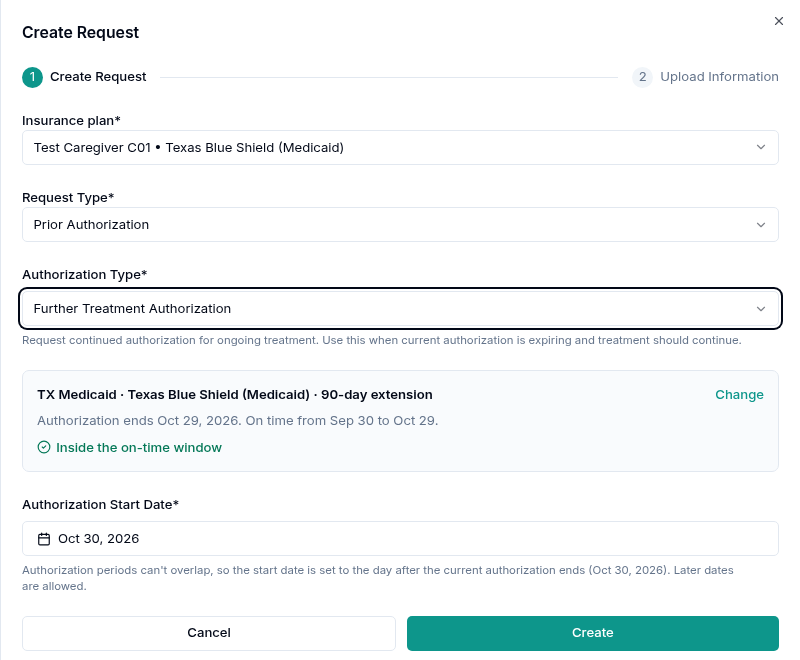
The checklist appears when you create a Further Treatment Authorization for a client whose insurance card is a Texas Medicaid MCO. Alpaca reads the client's authorization history and tells you which kind of request it is:
What Alpaca shows | When | What Texas wants |
|---|---|---|
90-day extension ("After the first 90-day authorization") | The client has had one Texas Medicaid treatment authorization so far | Attendance logs, a progress report signed by the BCBA and a parent, and the CCP form |
180-day recertification ("Every 180 days after that") | Every request after the extension | Attendance logs, the re-evaluation signed by the parent, a diagnosis report no older than 3 years, and the CCP form |
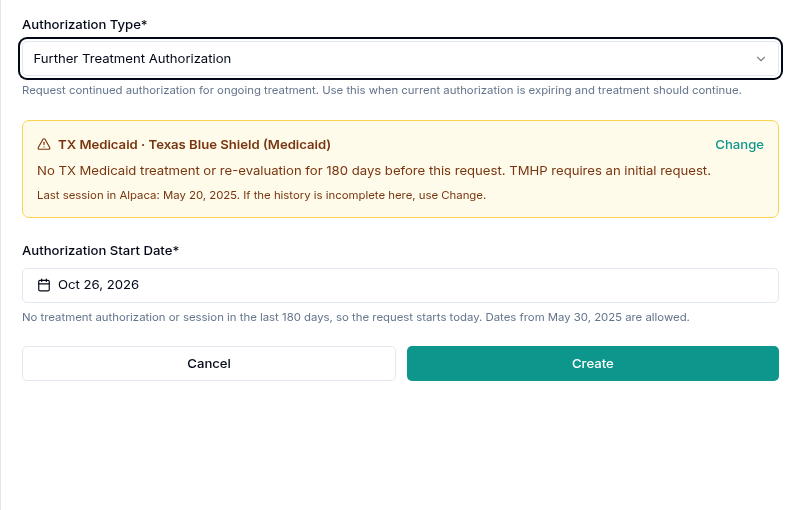
gap in service | No Texas Medicaid treatment authorization and no signed treatment session for 180 days or more before the request | A new initial request. There is no checklist. |
Commercial requests are unchanged. If a client has commercial insurance as primary and Texas Medicaid as secondary, a request on the commercial card is unchanged too.
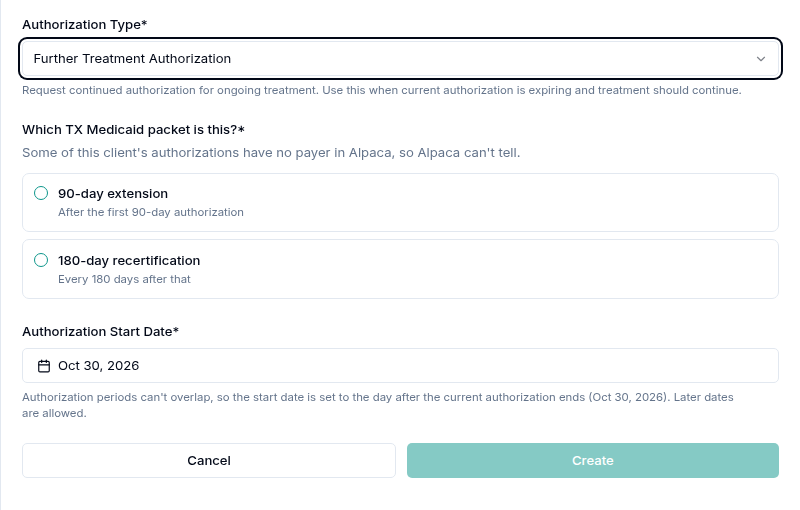
If Alpaca can't tell from the history (for example, an older authorization has no payer in Alpaca), it asks Which TX Medicaid packet is this? Pick the right one before you can create the request. You can also use Change at any time; changing the type never deletes documents you have already added.
When the client has been out of service for 180 days or more, you see the gap notice instead. The start date moves to today, because Texas treats the request as a new start. If you know the history in Alpaca is incomplete, use Change.
Who can do what
Task | Who can do it |
|---|---|
Create attendance logs | The Admin, Assistant Admin, Director and Clinician roles |
Create the request and submit it | Anyone who can create prior authorization requests for the client |
Generate, edit and sign the progress report; write the low-attendance justification | A BCBA in your organization. The report is signed by the BCBA who led its 97155 session. |
Sign the progress report or the re-evaluation as a parent | Only the caregivers you tick when you send the request, and only if they have a parent portal account |
Team members with the Lead RBT or Organization User role (usually RBTs) can view the documents in a request, but they don't see the Attendance log export and can't generate, write or upload anything in the checklist. A Director or Admin who isn't a BCBA can create the attendance logs but can't generate or sign the progress report. The report is a clinical statement, so it has to come from a BCBA.
Before you start: when to submit
Texas only accepts a request inside its window. Alpaca shows the window on the request and warns you if you're outside it:
90-day extension: in the last 30 days of the current authorization.
180-day recertification: no earlier than 60 days before the current authorization ends. The re-evaluation itself should be done in the last 60 days of the authorization.
If the authorization has already ended, you can still submit, but sessions before the payer receives the request will be denied. That's why it pays to start early.
Step 1: Create the attendance logs
Texas asks for attendance logs so the payer can see that the approved hours were used. Alpaca makes two: one for the child's sessions (97153, 97154, 97155, 97158) and one for parent training (97156, 97157).
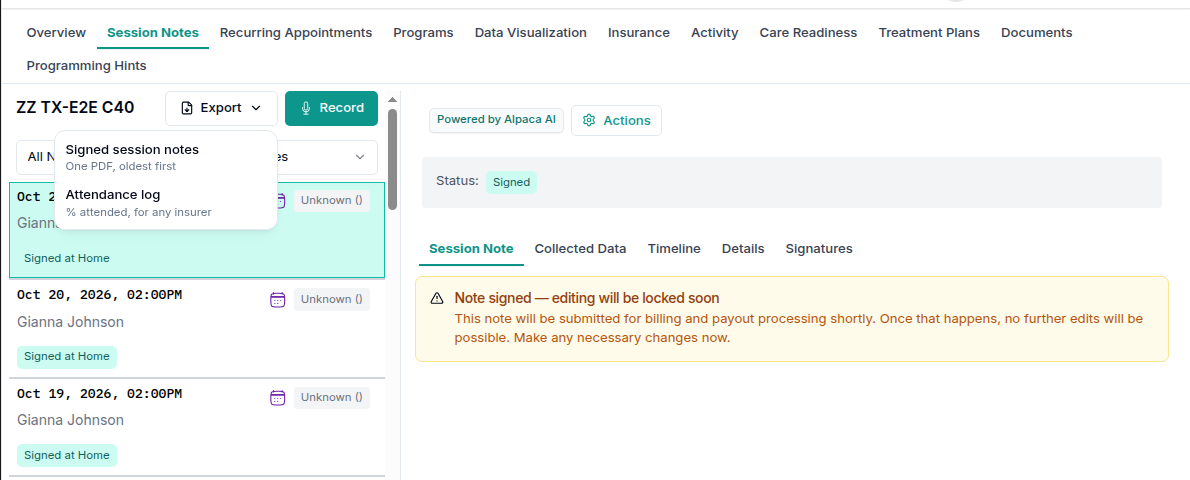
Open the client and go to Session Notes.
Select Export, then Attendance log.
On the Authorization tab, choose the authorization you're extending.
Check the figures, then select Generate.
Each card shows three figures: Scheduled hours, Scheduled sessions and Approved hours to date. A figure below 85% is flagged, because Texas asks you to explain attendance under 85%. Percentages are rounded down, never up, so 84.9% shows as 84%.
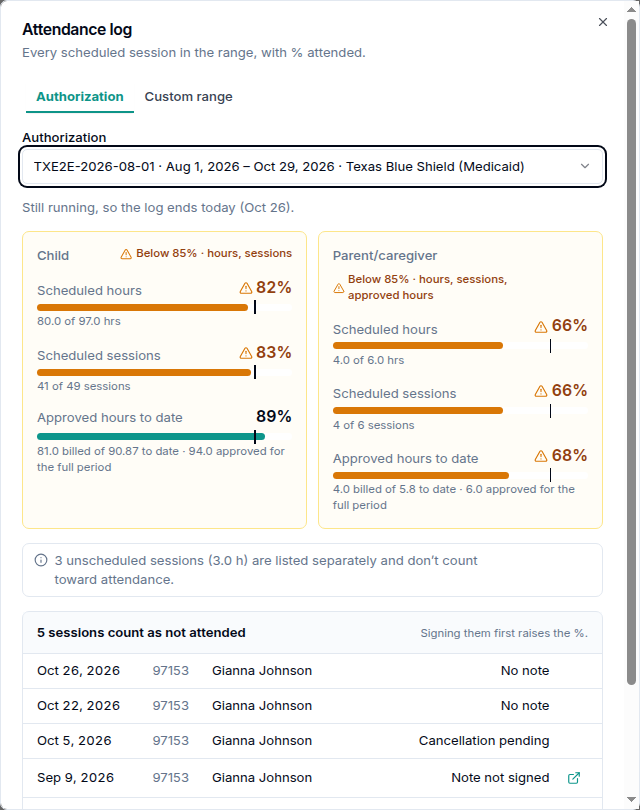
A few things affect the numbers:
Sessions without a signed note count as not attended. The dialog lists them ("Signing them first raises the %."). Sign those notes first if the session happened.
Unscheduled sessions are listed separately and don't count toward attendance.
An authorization that's still running ends today. Upcoming sessions aren't included.
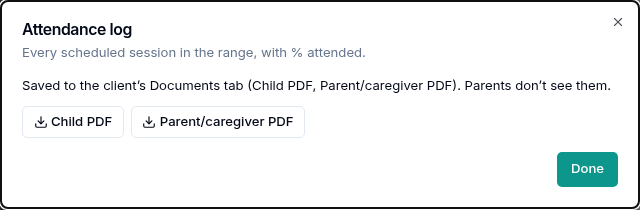
The logs are saved to the client's Documents tab as PDFs (and a CSV if you choose it). Parents don't see them.
You can also generate the logs from the request itself: on the log row, select Generate, then Generate and attach. That attaches them to the request in one go.
Step 2: Create the request and read the checklist
Open the client's Care Readiness tab and select Create Request.
Choose the Texas Medicaid insurance plan, Prior Authorization, and Further Treatment Authorization.
Check the detected type and the start date, then select Create.
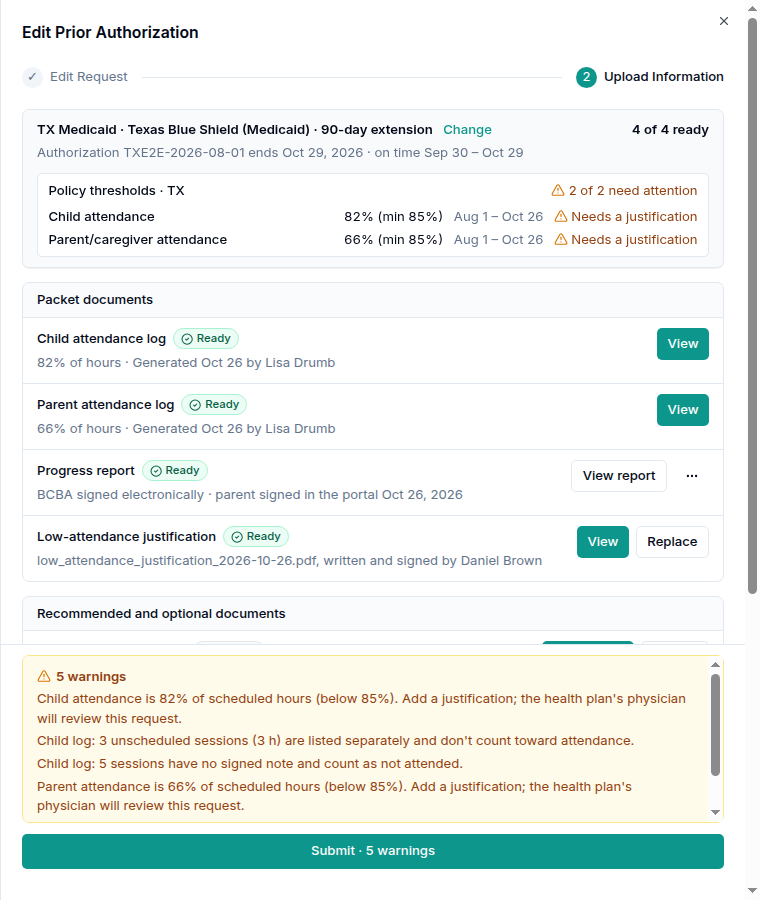
The second step, Upload Information, shows the checklist. Its heading names the program, the plan and the type, with a count such as 2 of 4 ready. Only the documents your clinic provides are counted. The CCP form is Alpaca's job, so it isn't in the count and isn't shown to you.
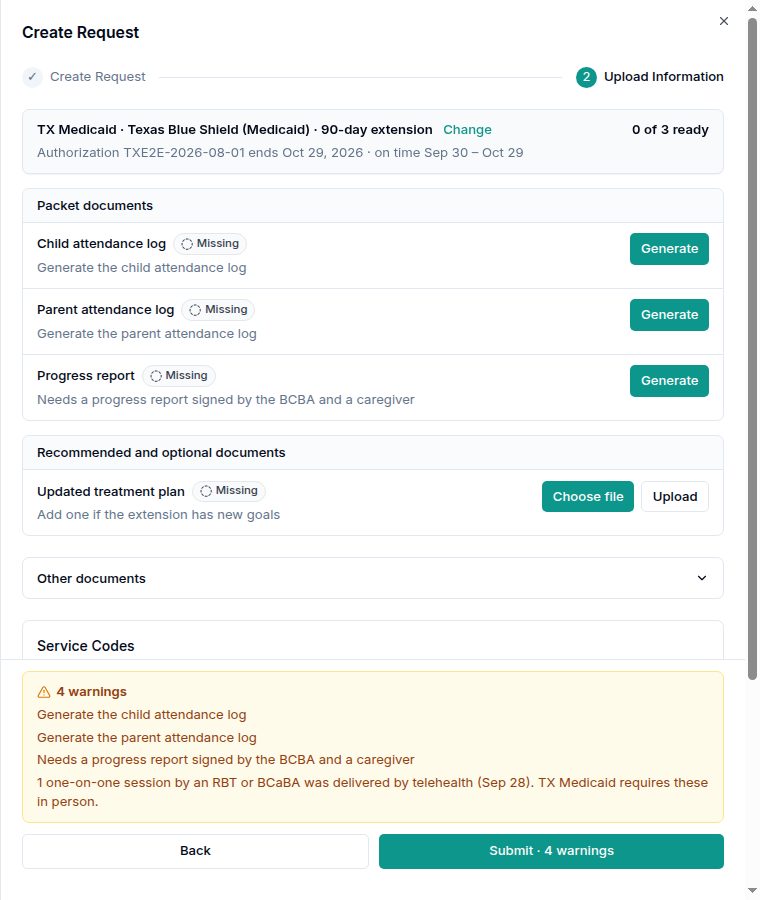
Each row has a status: Missing, Generated, Awaiting signatures (with who is still due, for example Awaiting signatures · Parent), or Ready. The buttons on each row do the next thing it needs: Generate, Write, Choose file, Upload, View, Replace, Sign or Request parent signature.
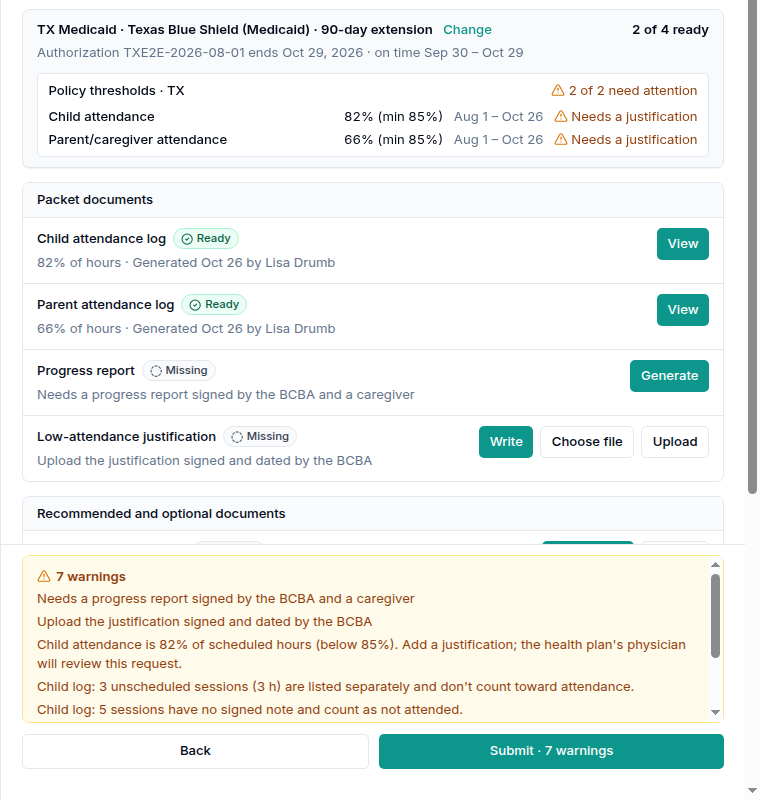
Once the logs are attached, Policy thresholds · TX shows the child and parent attendance against the 85% minimum. If either one is under 85%, a Low-attendance justification row appears (see step 4).
The yellow warnings panel
Everything Texas is likely to question is listed in the warnings panel above Submit, and the button tells you how many there are (for example Submit · 5 warnings). These are reminders, not stops. Common ones:
Attendance below 85% names the figure that tripped it. Add a justification; the health plan's physician will review the request.
One-on-one sessions by telehealth. Texas Medicaid requires one-on-one sessions by an RBT or BCaBA to be in person. Alpaca lists the days so you can explain them.
Unscheduled sessions and sessions without a signed note in the logs.
Timing: outside the on-time window, or after the authorization ended.
Recertification only: a re-evaluation done outside the last 60 days of the authorization, or more than 180 days old; a diagnosis more than 3 years old.
Service codes
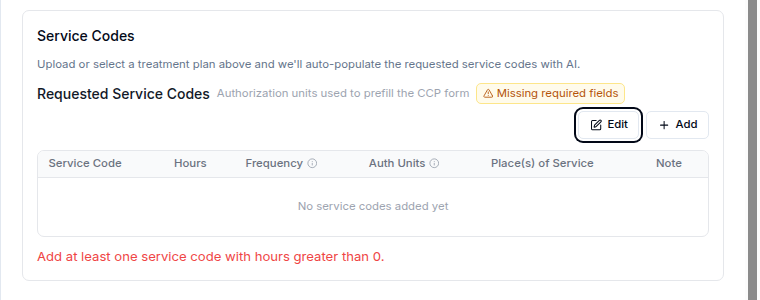
Under Requested Service Codes, add the codes and hours you're asking for. Alpaca uses them only to fill in the CCP form for the physician. If you attach a treatment plan, Alpaca fills them in from the plan; check them and fix anything it misread. If you change a code so it no longer matches the plan, you'll see "These codes don't match the treatment plan. You can still submit."
You must add at least one code with hours and a place of service before you can submit. Until then the table shows Missing required fields. The CCP form has room for 10 codes.
Step 3: The progress report (90-day extension)
Texas wants a progress report signed by the BCBA and by a parent for every extension. Alpaca builds it from your data. It never writes new goals or summaries for you.
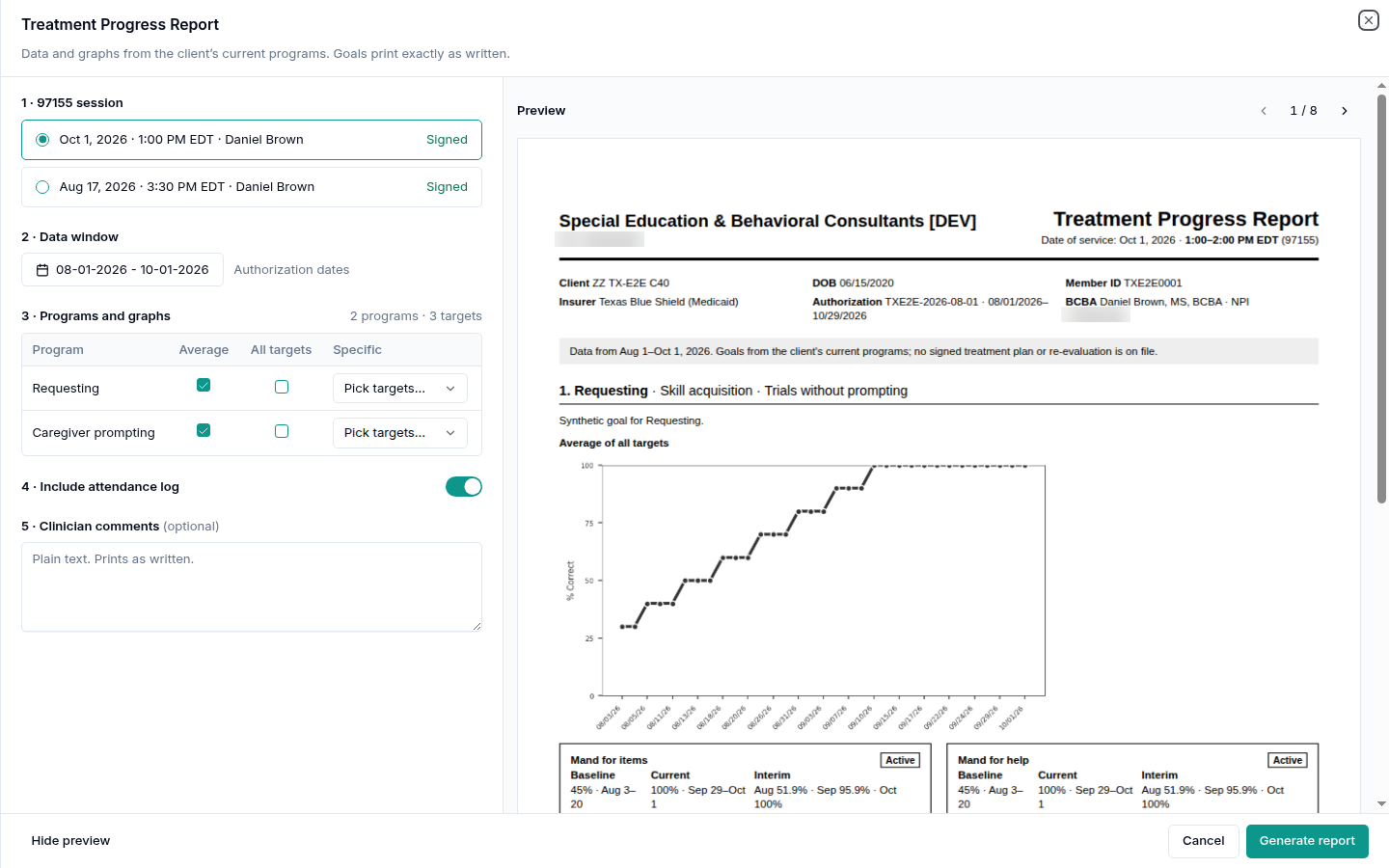
The BCBA generates it. On the Progress report row, select Generate. The report opens full screen with a live preview:
97155 session: the report is tied to one signed 97155 in this authorization. Pick it. If there isn't one, schedule a 97155 and sign its note first.
Data window: the authorization dates by default.
Programs and graphs: choose which programs and targets to show.
Include attendance log: on by default for Texas.
Clinician comments (optional): plain text, printed as written.
Select Generate report. The report is saved to the client's Documents, hidden from parents until it's fully signed.
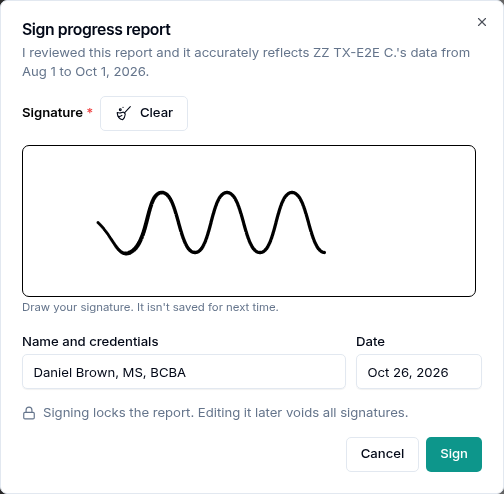
The BCBA signs it. Select Sign, draw your signature, and select Sign. Signing locks the report. If you edit it later, Alpaca saves a new version and the old signatures no longer count, so everyone signs the new one.
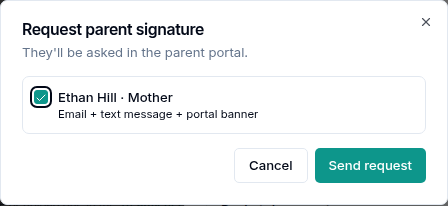
A parent signs it. Select Request parent signature, tick the caregivers who should sign, and select Send request. They're asked by email, text message and a banner in the parent portal, and reminded the next day. The row shows who it was sent to and when.
On their phone, the parent sees Sign {child}'s progress report under Needed for treatment. They review a short summary (each target's start and current level, and attendance), can open the full PDF, and sign. A signed copy then appears in their Medical Documents.
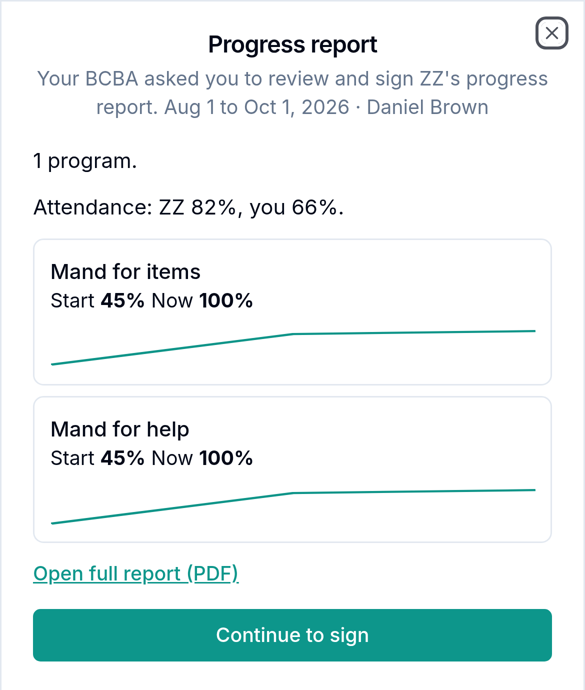
If the parent is with you, use Sign here now to hand them your device. If they signed on paper, use Upload signed copy (a PDF up to 25 MB). Uploading a paper copy cancels the portal request.
When both have signed, the row reads BCBA signed electronically · parent signed in the portal and turns Ready.
Submit after the parent signs. You can submit while the report is still waiting for the parent, but Alpaca then holds the request and sends it to the health plan only once the parent has signed. Submitting after the parent signs avoids that wait.
Step 4: The low-attendance justification
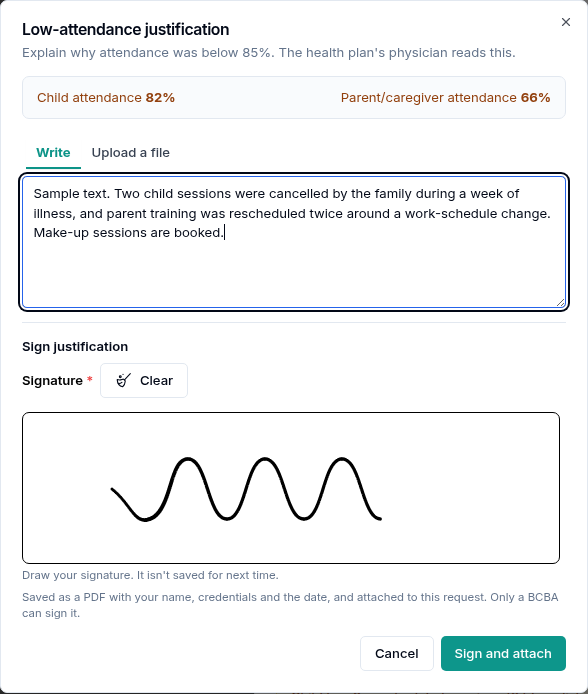
If any attendance figure (child or parent; hours, sessions, or approved hours to date) is under 85%, Texas wants the BCBA to explain why. The justification goes to the health plan with the request, signed by the BCBA, and the plan's physician reads it.
On the Low-attendance justification row, select Write.
Explain what happened: illness, family schedule changes, make-up sessions, and so on.
Draw your signature and select Sign and attach.
Alpaca saves it as a PDF with your name, credentials and the date. Only a BCBA can sign it. If you already have a signed letter, use Upload a file instead. Alpaca doesn't check the signature in an uploaded file, so make sure it's signed and dated.
If you regenerate the attendance logs after writing it, write the justification again so it matches the new figures.
With everything in place, the checklist shows every required row as Ready.
Step 5: The 180-day recertification and the re-evaluation
A recertification is built around the re-evaluation instead of a progress report. Do the re-evaluation in the last 60 days of the authorization, in the re-evaluation tool.
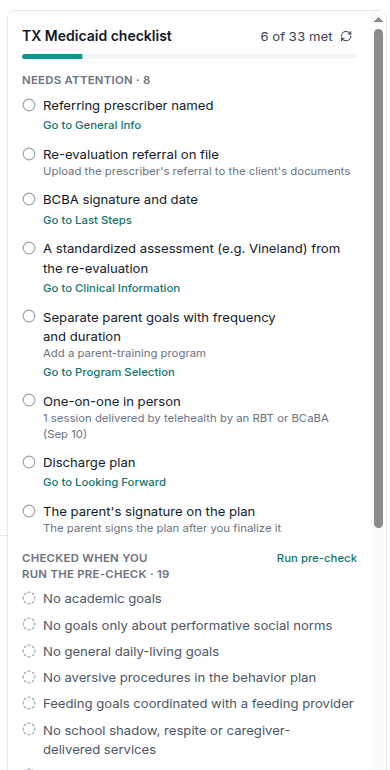
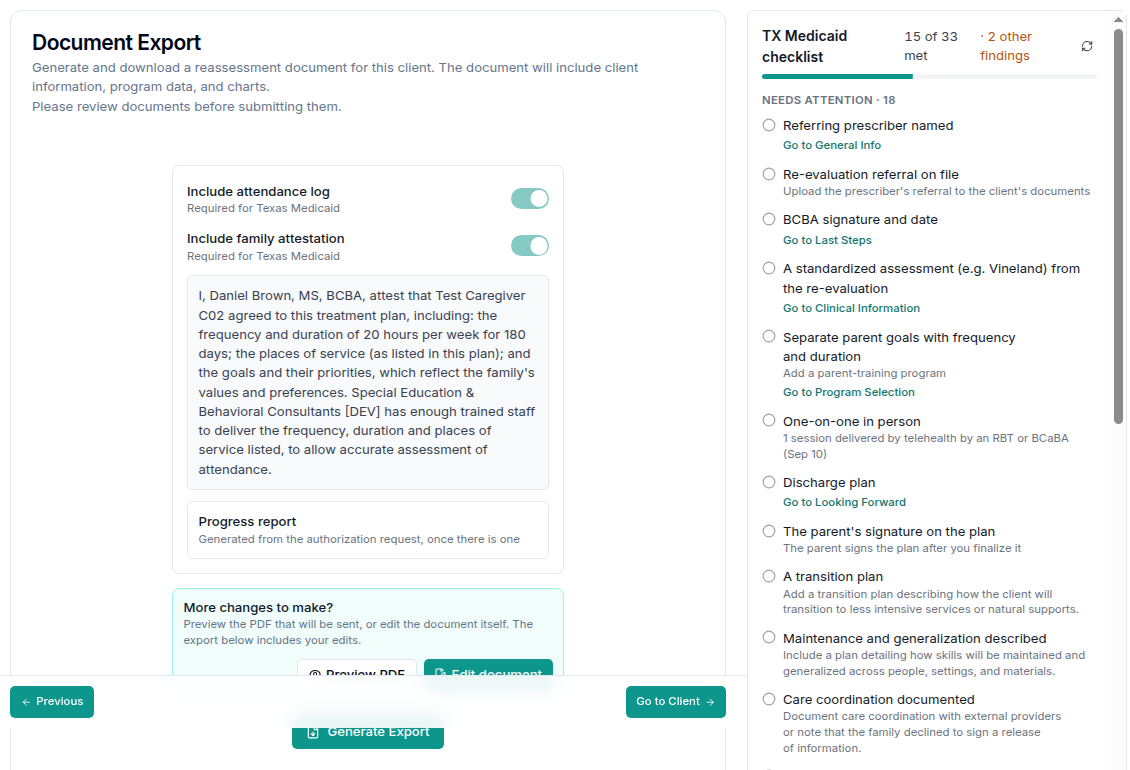
Use the TX Medicaid checklist. For a Texas Medicaid client, the panel on the right of the re-evaluation tool is the TX Medicaid checklist. It shows how many items are met and groups the rest into Needs attention, Checked when you run the pre-check, Met and Not needed. Each open item links to the step where you fix it. Select Run pre-check to have Alpaca read the plan against Texas's written requirements; the list updates when it finishes. Nothing in the checklist stops you from finishing the plan. It's there so the payer doesn't send it back.
Document Export. Texas needs two extra sections in the document: the attendance log and the family attestation (your statement that the family agreed to the plan's hours, places of service and goals). Both are switched on and marked Required for Texas Medicaid.
Finalize and get the parent's signature. On the client's Treatment Plans tab, finalize the plan, then select Request signature. The parent signs the plan in the parent portal.

Create the request. Create the request as in step 2. Alpaca detects the 180-day recertification and attaches the finalized re-evaluation for you.
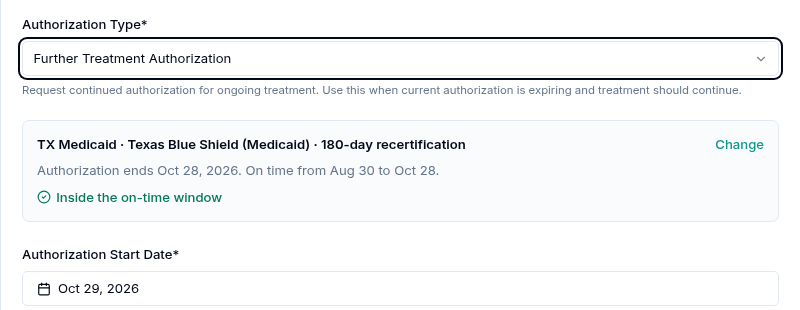
A recertification needs a progress report only if the re-evaluation is more than 60 days old when you submit. When it does, the BCBA signs it and it's final; the parent doesn't sign the recertification report.
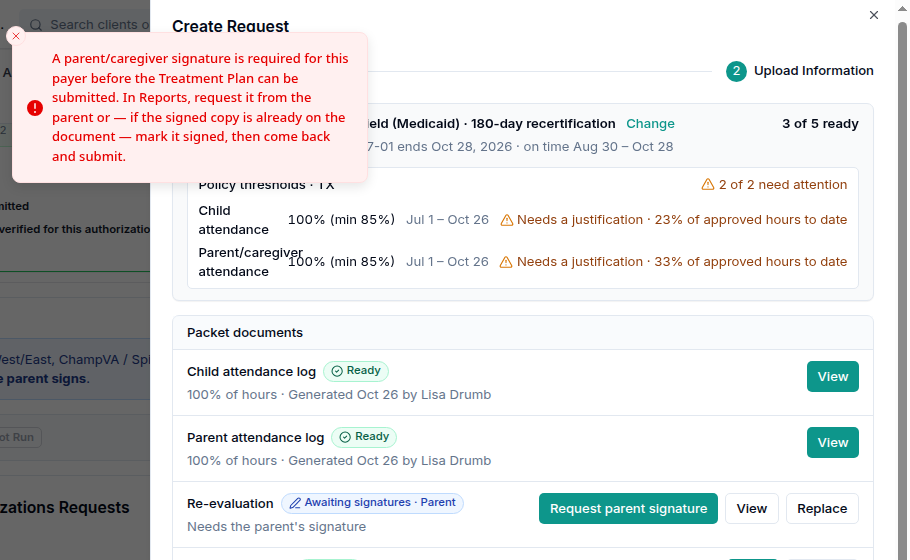
You can't submit a recertification until the parent has signed the re-evaluation. If you try, you'll see this message. It says "In Reports"; that's the Treatment Plans tab.
Step 6: Submit, and what happens next
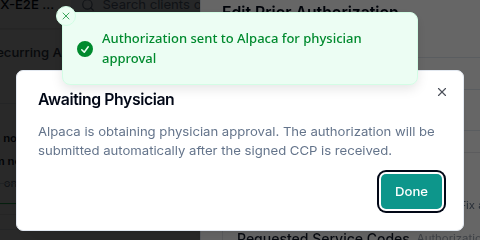
Select Submit. You'll see Authorization sent to Alpaca for physician approval and an Awaiting Physician message: Alpaca is getting the physician's approval, and the request will be submitted automatically once the signed CCP form is back.
What Alpaca does next:
Prepares the CCP form from your request (type, dates and service codes).
Sends it to the child's physician and follows up until it's signed.
Checks the signed form and attaches it to the request.
Sends the full request to the health plan as soon as everything is ready.
You don't need to do anything in these steps. On Care Readiness, the request shows an Awaiting Physician badge with "Alpaca is obtaining physician approval — the authorization submits automatically once the signed CCP is received." Once Alpaca has sent the form, the row also shows who it was sent to and when. The Packet column summarizes the checklist, for example TX · 90-day extension · 4 of 4 ready · 5 warnings.
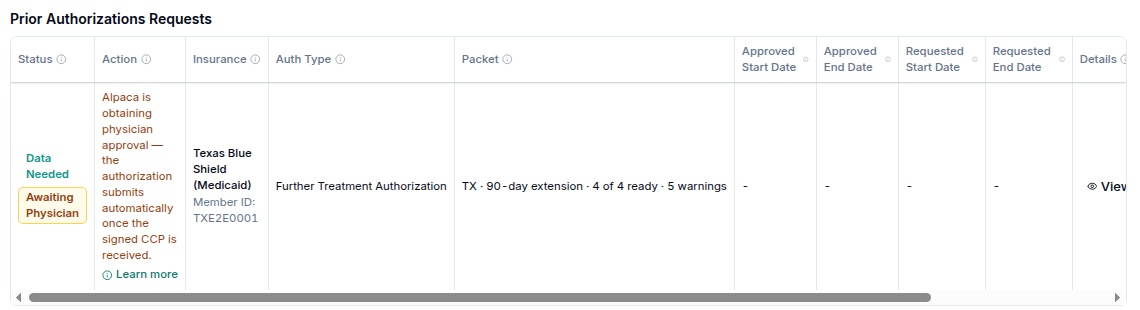
After the request reaches the health plan, its status moves on the same way as any other prior authorization (for example Request Submitted, then Payor Approved or Payor Denied). Open View on the row to see the documents that were sent.
Changing a request after you submit. Once Alpaca has sent the CCP form to the physician, the request's dates, service codes and treatment plan can't change, because the physician is signing those exact details. Ask Alpaca's team if something needs to change.
If you regenerate an attendance log after submitting, the row tells you a new log was made after submission. The new log isn't sent; the one you submitted stays with the request.
What's shared with the family
Parents never see the attendance logs, an unsigned progress report, or the justification.
Only the caregivers you tick can see and sign a progress report.
Once the report is fully signed, the parent gets a copy in their Medical Documents. If the report is later replaced by a new version, the old signed copy is removed from their documents.
Recover from common problems
What you see | What it means | What to do |
|---|---|---|
A parent/caregiver signature is required for this payer before the Treatment Plan can be submitted. In Reports, request it from the parent or — if the signed copy is already on the document — mark it signed, then come back and submit. | The re-evaluation (recertification) hasn't been signed by the parent. | On Treatment Plans, select Request signature (or Signature already printed on PDF if it's already signed on paper), then submit again. |
This request needs the finalized re-evaluation, signed by the parent, before it can be submitted. Attach it, then submit. | A recertification has no re-evaluation attached. | Finalize the re-evaluation on Treatment Plans and get the parent's signature, then attach it on the Re-evaluation row. |
Add the service codes for the CCP form before submitting. / Add at least one service code with hours greater than 0. / Missing required fields | The physician form needs at least one code with hours and a place of service. | Add or edit the codes under Requested Service Codes. |
Which TX Medicaid packet is this? / Choose the TX Medicaid packet type | Alpaca couldn't tell from the history whether this is an extension or a recertification. | Pick the type. Ask your prior-auth contact if you're unsure. |
No TX Medicaid treatment or re-evaluation for 180 days before this request. TMHP requires an initial request. | There's been a gap of 180 days or more. (TMHP is Texas Medicaid & Healthcare Partnership, which runs Texas Medicaid.) | Submit as a new start. If Alpaca's history is incomplete, use Change. |
No signed 97155 session in this authorization | The progress report must be tied to a signed 97155 in the authorization. | Schedule a 97155, have the BCBA sign its note, then generate the report. |
Only a BCBA in this organization can do this / This report is signed by another BCBA | The report and the justification are BCBA-only, and the report is signed by the BCBA who led its 97155. | Ask that BCBA to sign. If they've left your organization, pick a new signer in the sign dialog. |
Generate the request's attendance log first | The report or justification needs the request's attendance log. | Generate the logs from the request (step 1). |
Attendance meets 85%: no justification is needed | No figure is under 85%. | Nothing to do. |
Sessions changed after this log was generated · Attach a current log | A session or note changed after the log was made. | Generate the log again so the numbers are current. |
A new child log was generated {date}, after submission · It isn't sent; the submitted log stays | You made a new log after submitting. | Nothing to do, unless you need the new one sent; then ask Alpaca's team. |
{n} one-on-one session(s) by an RBT or BCaBA … delivered by telehealth ({days}). TX Medicaid requires these in person. | Texas Medicaid expects one-on-one sessions in person. | Explain the sessions in your documentation; you can still submit. |
Child attendance is {n}% of {figure} (below 85%). Add a justification; the health plan's physician will review this request. | Attendance is under Texas's 85% guideline. | Write the low-attendance justification (step 4). |
Extensions are on time only in the last 30 days of the authorization (from {date}). / The payer accepts recertifications no earlier than 60 days before the authorization ends ({date}). | You're early. | Wait for the window if you can; you can still submit. |
The authorization ended {date}. Sessions before the payer receives this request will be denied. | You're late. | Submit as soon as possible. |
The diagnosis ({date}) is more than 3 years old at the re-evaluation. TMHP needs one from the last 3 years. | The diagnosis report is too old. | Upload a current diagnosis report. |
The re-evaluation is more than 180 days old. TMHP requires a new re-evaluation. | The re-evaluation is out of date. | Complete a new re-evaluation. |
Alpaca already sent the physician form for this request, so its dates, service codes and treatment plan can't change now. Ask Alpaca's team to update it. | The physician is signing those exact details. | Contact Alpaca's team. |
The physician form for this request was just signed or closed. Submit again. | The request changed while you were submitting. | Select Submit again. |
This version was replaced. Open the current one. | Someone saved a newer version of the report. | Reopen the report from the request. |
A prior authorization request already exists for this client. Please check the existing requests or wait for it to complete. | The client already has an open request. | Open it from Care Readiness with Files Needed. |
Current limitations
This checklist is for Texas Medicaid only.
After the physician's form comes back, it can take up to an hour before the request shows as sent to the health plan.
Alpaca doesn't yet link a make-up session to the cancelled session it replaces. The cancelled session still counts as missed. Mention make-ups in the justification.
The progress report shows data from Alpaca only. Data collected outside Alpaca doesn't appear.
Alpaca can't verify a signature inside a file you upload.