Download your team’s W-4 forms for HR compliance
Last updated: October 1, 2026
Download W-4s produces each employee’s federal Form W-4 from the withholding details
payroll holds for them, as a zip of separate PDFs, and files a copy on each employee’s
Documents tab. It exists so that producing an employee’s W-4 for an audit or an HR
request is one click rather than a request to payroll.
The form is a reconstruction, not the signed original. Payroll collects the W-4 during
worker onboarding but does not keep the completed document, so Alpaca fills the IRS’s own
blank W-4 with the withholding values on file. Every line the form needs is available, so
the figures are the ones payroll actually uses to calculate that person’s taxes — but the
document is unsigned.
Three promises hold throughout:
Nobody is left out silently. Every employee in scope appears in
manifest.csv,
either naming their file or giving the reason there isn’t one.It refuses rather than guesses. An unrecognised filing status omits that employee
with a reason instead of producing a W-4 with Step 1(c) blank, which would look valid
and not be.Filing a form does not widen who can read it. A W-4 carries an unmasked Social
Security number, so the copy on the Documents tab stays behind the same permission
that governs a Social Security number everywhere else in Alpaca.
Who can use it
You see Download W-4s when both of these are true:
your role holds the permission that governs a worker’s Social Security number, date of
birth and bank details — the same permission that shows the Worker Profile tab; andyou are working in the organization whose team you are looking at.
Today that is Admin only. Assistant Admin, Director and HR Manager do not
get it, deliberately: all three can open a team member’s profile, and none of them is
allowed to see an unmasked Social Security number. Holding the permission does not widen
what you see anywhere else — it is the same data the Worker Profile tab already shows,
in bulk.
If you do not hold it, the button is absent rather than disabled. A page that offers a
control for data you cannot have is a page advertising that data exists.
The organization is always taken from the session you are signed in to. There is no way to
ask for another clinic’s forms.
Generate the forms
Open My Team.
Select Download W-4s in the header, beside Invite Team Member. A number in
brackets — Download W-4s (23) — is how many forms the last stored packet contained.
It is usually fewer than the size of your team, because not everyone has a form.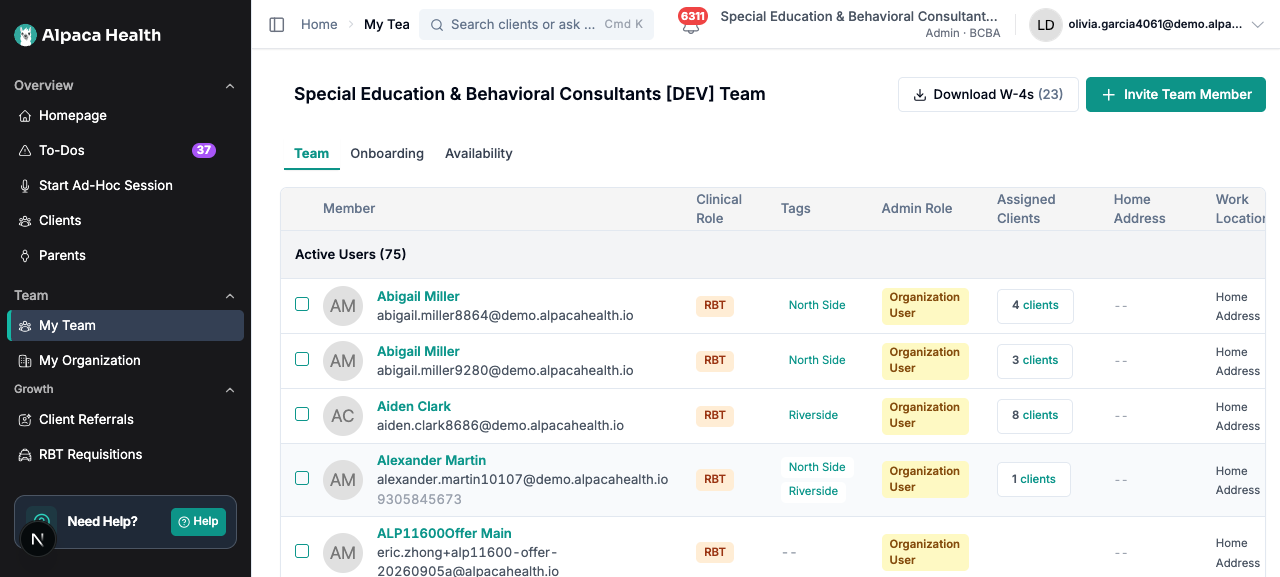
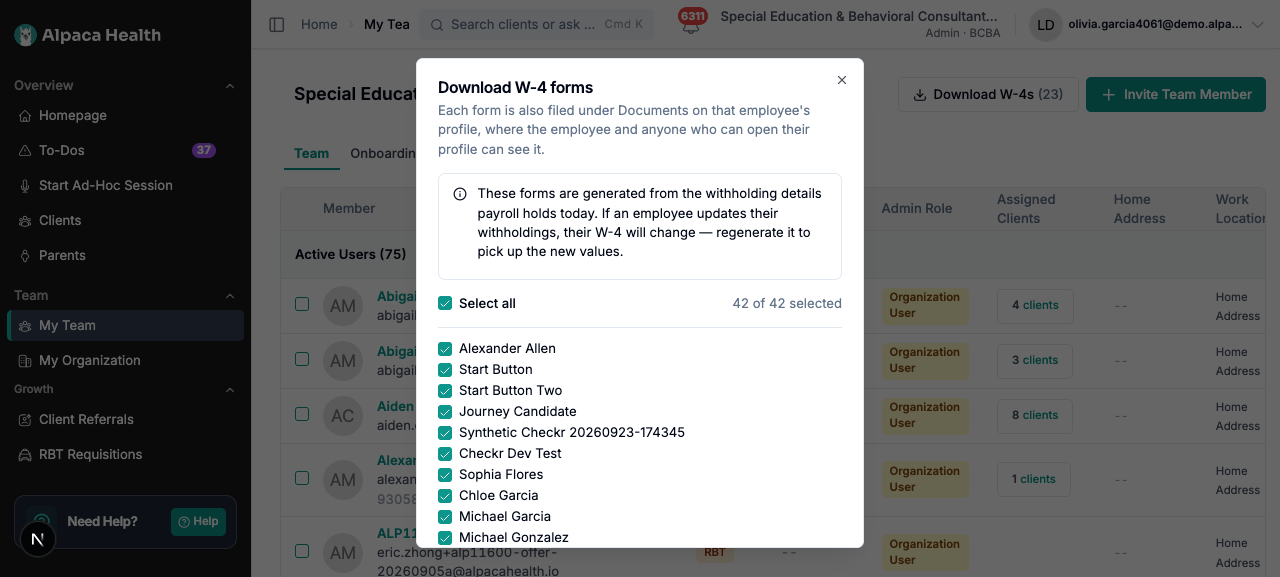
The Download W-4 forms dialog opens and lists the team members payroll knows about,
sorted by last name.The list is not the My Team table. It is everyone on your roster who has a payroll
record, which includes suspended and pre-start staff — a departed employee’s records
have to stay reachable, and a new hire can complete payroll onboarding before their
start date. So the dialog can list people the table hides.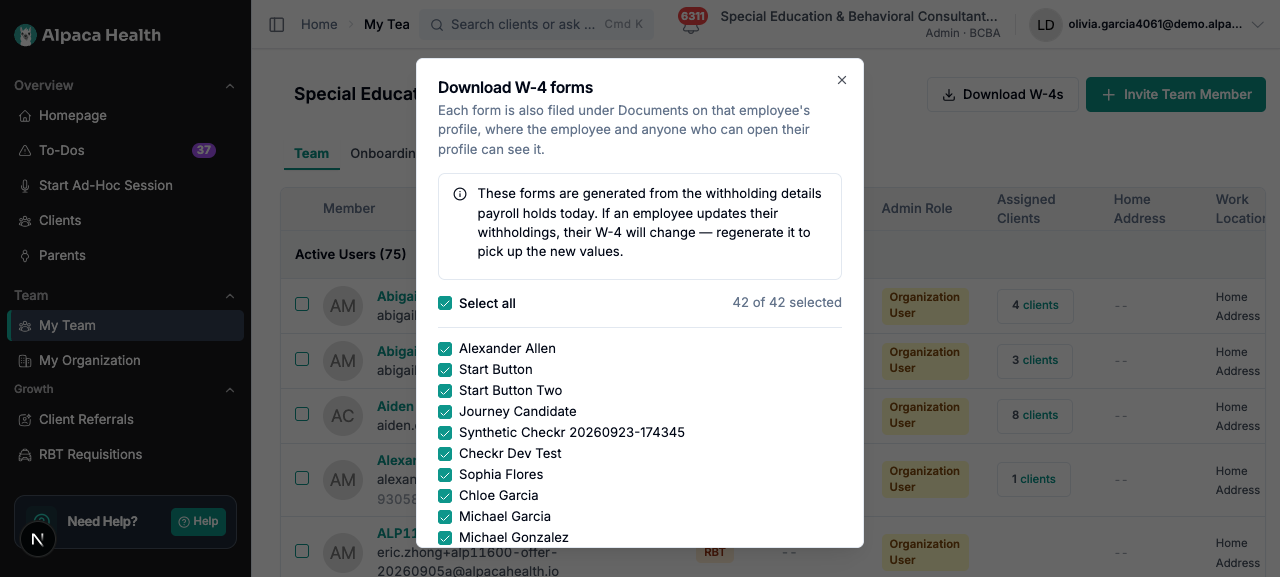
Leave Select all ticked for the whole team, or untick it and choose individuals. The
counter reads N of M selected.Select Download N W-4s.
While the packet builds, the button reads Preparing, then counts — 12 of 42 —
and a progress bar appears above it with Preparing 12 of 42 forms…. The count
advances once per employee, including for employees who turn out to have no form, so a
clinic whose payroll setup is mostly incomplete still sees the bar move.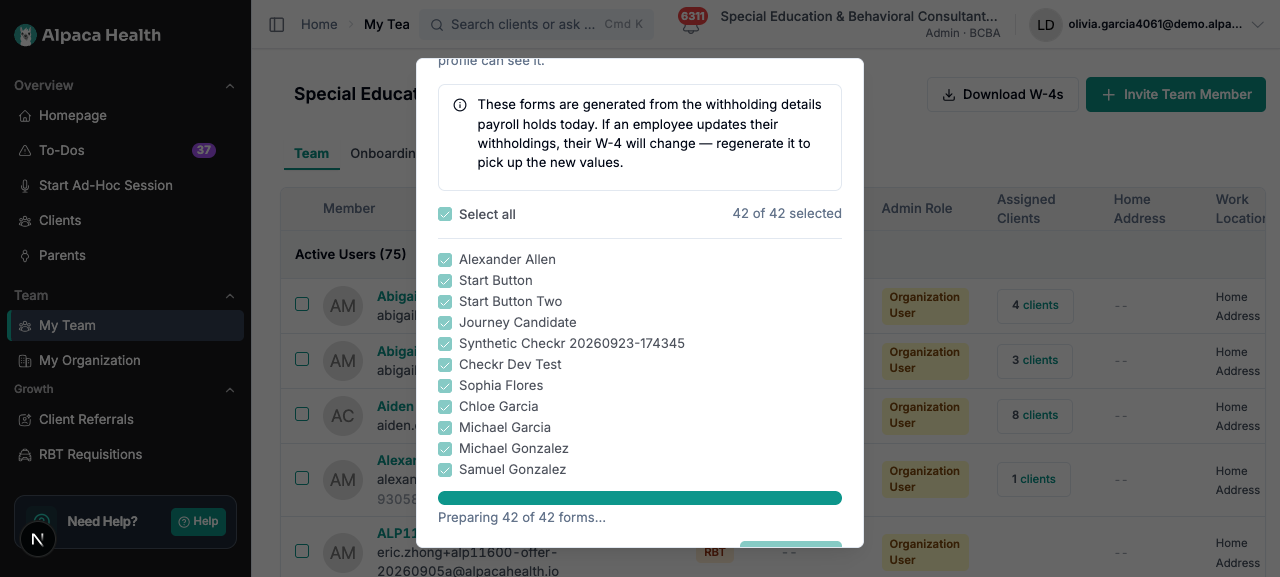
The zip downloads as
W4_packet_2026-09-30.zip.
Inside it:
Entry | What it is |
|---|---|
| One employee’s form. The id distinguishes two people with the same name; the date is what stops a stale copy passing for a current one. |
| Every employee in scope, included or not. Always present, even when every employee rendered — “40 of 40” is information too. |
manifest.csv lists omissions first, so they are not buried under forty successful rows.
Its columns are status, employee_last_name, employee_first_name, employee_id,work_state, file and notes.
After the download
A confirmation appears: Downloaded 23 W-4s. Each one is also filed under Documents on
that employee’s profile.
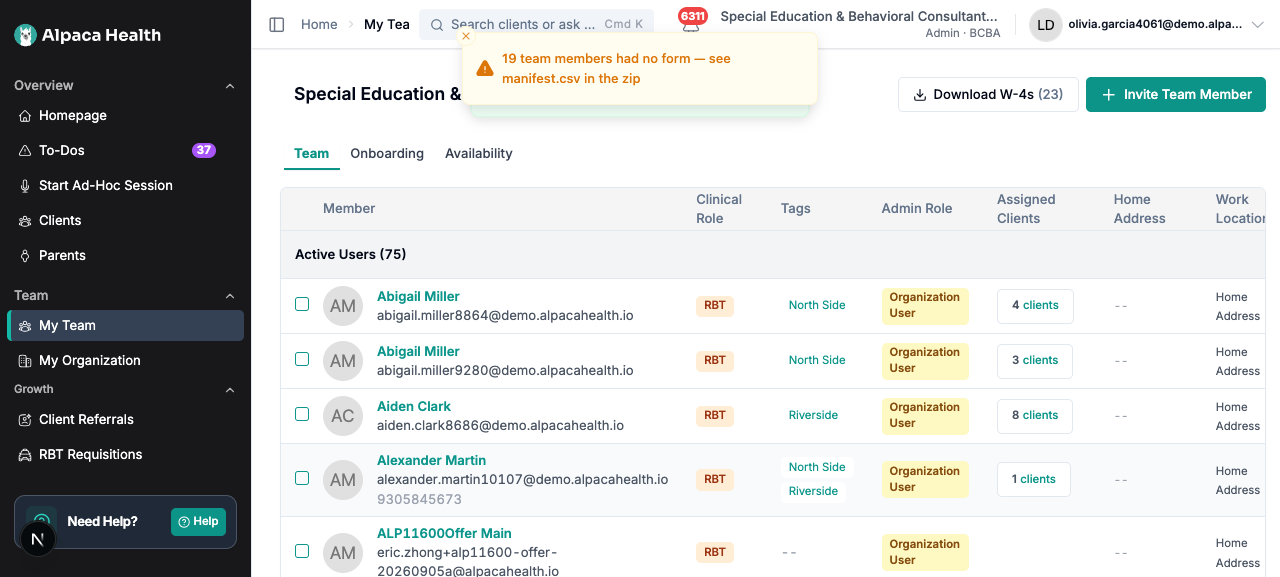
If anybody was left out, a second warning follows: 19 team members had no form — see
manifest.csv in the zip. Read it before filing the packet. A packet that quietly contains
23 of 42 employees is worse for an audit than one that says which 19 are missing and why,
because the first looks complete.
A majority-omission packet is normal, not a failure. Only employees who have finished the
tax step of payroll onboarding have a form to produce.
Find a single employee’s W-4
Every form the packet produced is also on that person’s Documents tab.
Open My Team and select the person.
Open Documents.
The row’s Document Type reads Form W-4 (Federal), its File Name is
W4_2026-09-30.pdf, File Type is PDF, and Uploaded Date is the day the form
was generated.Select View on that row to open the PDF.
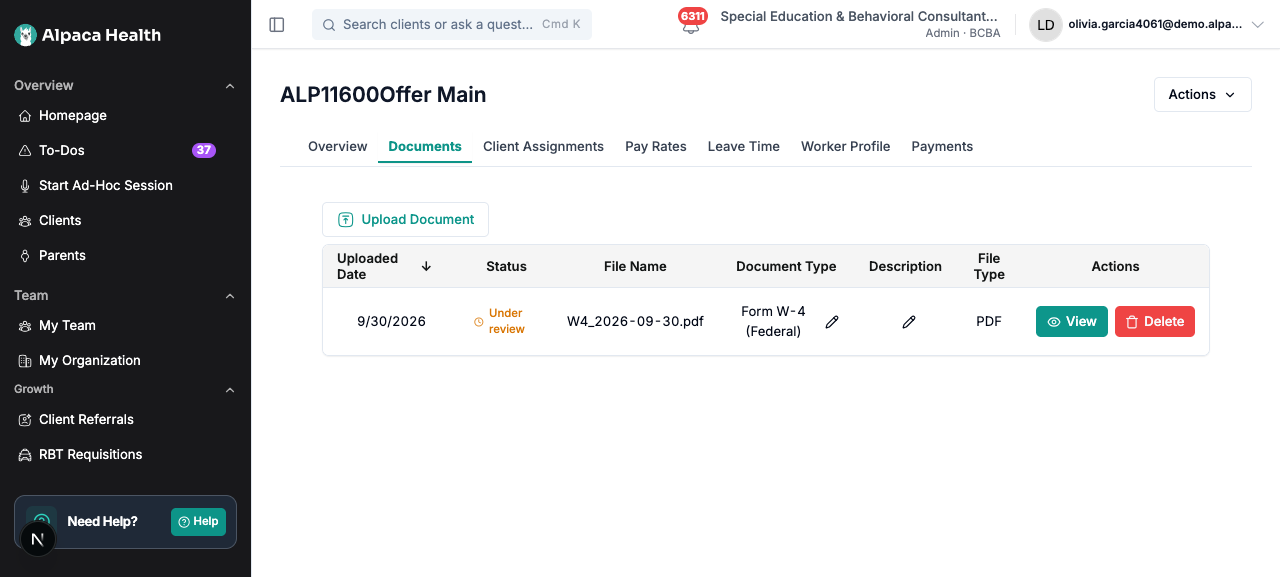
The row’s Status column reads Under review. That is the default status every
document in this table starts with; nobody is reviewing a generated W-4 and no action is
waiting on anyone. Ignore it.
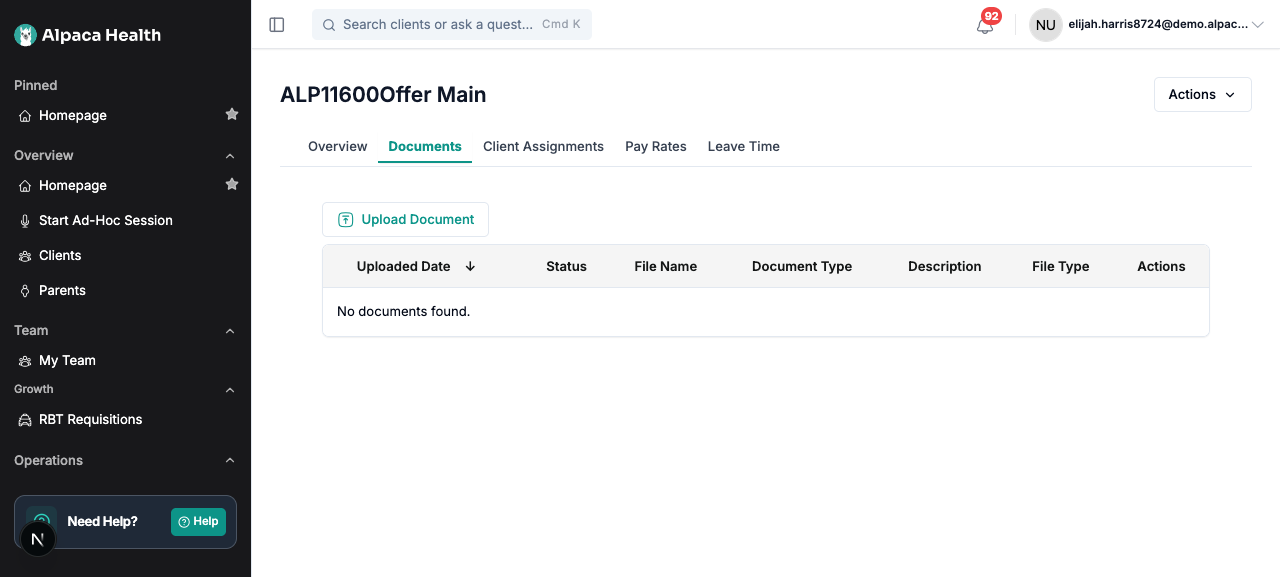
The employee can always reach their own form, whether or not they hold any payroll
permission — that is half the reason for filing it. Anyone else needs the Social Security
number permission, even though a wider set of roles can open the tab.
Regenerating replaces that row rather than adding a second copy. One current W-4 per
employee, stamped with the date it was generated. An old copy of somebody’s Social Security
number that nobody asked to keep is a liability, and “which of these is current” is not a
question an employee should have to answer.
Download the packet again
Download last packet in the dialog footer returns the stored packet immediately,
without rebuilding anything and without checking payroll first. It appears once a packet
exists. Use it when you want the file you already filed.
Download N W-4s builds a fresh packet. It is meant to reuse the stored one when nothing
in payroll has changed — Alpaca compares the stored packet against payroll on every request
— but in practice that comparison almost always reports a change and rebuilds. Expect
roughly 20 seconds for a 40-person clinic and around a minute for the largest, on every
click. See Current limitations.
Three things genuinely change a packet, and each one has to force a rebuild:
a withholding value changed — the obvious one;
somebody joined or left — the packet’s contents change even when no individual’s
withholding did;a new annual revision of the IRS form was loaded — every rendered form changes with
it, so a packet built on last year’s blank must not survive the upgrade.
A chosen subset always rebuilds by design. The comparison describes the whole roster, so
it cannot answer “is this particular three-person zip still current.” That is affordable
because the durable record is the W-4 on each employee’s Documents tab, not the zip.
What makes this safe
A build survives leaving the page. Refresh mid-build, or come back later, and the
dialog says A packet is already being built for your organization — it will finish even
if you leave this page. Selecting Download N W-4s again with the same selection joins
that build and picks the progress bar back up, rather than starting a second one. It does
not download automatically when the build finishes; a file arriving without a click is
both surprising and blocked by browsers, so the finished packet is offered as Download
last packet.
Two people cannot build two different packets at once. If someone else’s build for a
different set of employees is already running, your click is refused rather than joined.
Joining it would have handed you a packet for somebody else’s request — an all-staff click
that joined a running three-person build would download three forms and report
Downloaded 3 W-4s as though that were the clinic. Wait a moment and click again.
A stuck build does not lock the clinic out. A build whose worker died stops counting as
running after 30 minutes, so the next click starts a fresh one.
One bad record never denies everybody else their forms. An employee whose filing status
cannot be read is named in the manifest; the other 151 forms are unaffected.
Every generated form and every download is recorded in the access log, per employee,
before the packet becomes downloadable. If that record cannot be written, the packet is not
served — an unaudited export of a Social Security number is worse than a failed download.
The forms are not fetchable by URL. A filed W-4 is served only by the route that checks
who is asking; the generic file-serving routes refuse withholding forms outright, and
answer not found rather than forbidden, because whether a given person has a W-4 on
file is not something an unauthorized caller should be able to confirm either way.
What it will not do
It will not produce a signed W-4. The signature line on the IRS form is printed, not
a fillable field, so there is nothing to populate. The document is an accurate record of
the withholding on file, not the form the employee signed. Whether that satisfies a
particular audit is a compliance judgment, not something Alpaca can decide.It will not produce a state withholding certificate. No state’s certificate is
available yet. For a state that taxes wages, the manifest says
State withholding form for CA not yet available in Alpaca; for a state that does not
tax wages it says No state withholding form required in TX, which is a complete
answer rather than a missing file.It will not guess a filing status. An unrecognised code omits that employee with
Payroll holds a filing status this form does not recognise — contact support. A W-4
with no filing status is not a valid W-4, and a blank Step 1(c) is indistinguishable
from an employee who chose nothing.It will not invent a figure. If payroll holds several other-income entries that
cannot be added up, line 4(a) is left empty rather than filled with a number the
employee never entered.It will not split a dependents total back out. Payroll stores the Step 3 total, not
the per-category lines that produced it, so 3(a) and 3(b) stay blank and only the total
box is filled.It will not fill the employer’s section — employer name, address, EIN, first date of
employment. This is a record of what withholding is on file, not a submission to the
IRS.It will not include anyone outside your organization. Selecting somebody who is not
on your roster fails the request rather than producing a packet quietly missing the
person you asked for.It will not accept an empty selection. Unticking everybody disables the download
button rather than falling back to the whole team.It will not keep old packets. Each build replaces your clinic’s stored packet, and
each employee’s filed form replaces the previous one.It will not delete a form it can no longer reproduce. If payroll data becomes
incomplete, the previously filed W-4 stays on the Documents tab — it was validly
generated when it was generated, and deleting it would destroy the only copy.
Your data
What it reads: each employee’s legal name, home address, Social Security number,
filing status, multiple-jobs declaration, dependents total, other income, deductions,
extra withholding and exemption status, from your payroll provider. Reading the whole
organization is a single request, so a build is one call to payroll regardless of how
many employees it covers.What the forms contain: an unmasked Social Security number and a home address. Treat
the zip accordingly.What is logged: one access-log entry per employee whose form was built, one per
packet download, and one every time a filed W-4 is opened — including when the employee
opens their own. “Who read this Social Security number” is what that log exists to
answer.What is stored: one packet per organization, replaced on each build, and one current
W-4 per employee, replaced on each regeneration. Employee names appear inside the archive
— in the filenames and the manifest — because a packet of files named after opaque ids
would be unusable for filing. Names stay out of the HTTP filename, which persists in
browser history and proxy logs.What leaves Alpaca: nothing new. The withholding data comes from your existing
payroll provider and the forms are generated inside Alpaca.
Recover from common problems
What you see | What it means | What to do |
|---|---|---|
No team members are set up in payroll yet, so there are no W-4s to generate. | Nobody on your roster has a payroll record. | Complete payroll onboarding for at least one employee. |
Payroll holds no federal tax setup for this employee yet (in | That person has not finished the tax step of payroll onboarding. | Ask them to complete it, then rebuild. This is the most common omission. |
Payroll holds a filing status this form does not recognise — contact support | Payroll reports a filing-status code Alpaca does not map to one of the form’s three options. | Contact support with the employee’s name. Do not hand-edit the form. |
No state withholding form required in TX | That state does not tax wages, so no certificate exists to download. | Nothing to do. The packet is complete for that employee. |
State withholding form for CA not yet available in Alpaca | The state does have a certificate; Alpaca cannot produce it yet. | Obtain that state’s certificate outside Alpaca for now. |
No work state on record, so the state form could not be determined | The employee has no work state set. | Set the work state on their profile, then rebuild. |
A packet is already being built for your organization — it will finish even if you leave this page. | Someone — possibly you, before a refresh — started a build. | Select Download N W-4s again with the same selection to join it and watch the progress. |
3 team members had no form — see manifest.csv in the zip | The packet is not everybody. | Open |
The packet could not be built | The background job failed. | Try again. If it repeats, contact support. |
The packet is taking longer than expected — try again shortly | The build passed the ten-minute watch window. | Reopen the dialog; a finished packet is offered as Download last packet. |
Could not check the build status | The progress check could not reach Alpaca. | Reload the page. The build keeps running. |
Could not download the packet | The download itself failed. | Try again from the dialog. |
The packet is no longer available. Please rebuild it. | The stored zip is gone but the record of it remains. | Click Download W-4s again to rebuild. |
No W-4 has been filed for this team member | No form has ever been generated for that person, or they were always omitted. | Build a packet that includes them, then check |
This W-4 is no longer available. | The filed row exists but its file does not. | Rebuild the packet to file a fresh copy. |
Payroll provider could not be reached. Try again shortly. | Your payroll provider did not answer. | Retry shortly. This is a vendor outage, not an employee with no W-4 — the two are reported differently on purpose. |
A failure naming status code 409 | Another build is running for a different set of employees, or one finished in the instant you clicked. | Wait a moment and click again. |
A failure naming status code 400 | Payroll is not configured for this organization. | Ask your Alpaca contact to confirm the payroll connection. |
A 403 or a missing button means the permission, not a bug. Ask your organization
administrator.
Current limitations
Unsigned, and not labelled as such on the form itself. The generated PDF carries no
printed note saying it is a reconstruction; it is simply the IRS form filled in, with the
signature line blank. Anyone filing it should know what it is.Re-downloading rebuilds instead of reusing the stored packet. The intent is that an
unchanged clinic gets its packet back instantly. Verified behaviour is that Download N
W-4s starts a full rebuild almost every time, even seconds after the previous one, and
re-files every employee’s form. Nothing is wrong with the output — it is the same packet,
just rebuilt — but the wait is real, and Download last packet is the way to avoid it.The filed row’s Status says Under review. It is the table’s default for any document
and carries no meaning for a generated W-4.The dialog’s wording overstates who can see the filed copy. It reads “where the
employee and anyone who can open their profile can see it”. The enforced rule is
narrower — the employee themselves, or someone who holds the Social Security number
permission. Treat the enforced rule as authoritative.Federal only. No state withholding certificate exists yet for any state. Every
taxing state reports that honestly rather than offering a blank form.Full team or a chosen subset, one at a time. A subset never becomes your clinic’s
stored packet, so only an all-team packet can be re-downloaded without rebuilding.One build per clinic at a time. A second click for a different selection is refused
rather than queued.The single-employee form has no page of its own. To produce one person’s W-4, select
just that person in the dialog, or open the copy on their Documents tab.Largest clinics take around a minute. The work is one call to payroll and then a
render per employee.The IRS revises the form annually. A new revision has to be loaded into Alpaca before
it is used, and loading it invalidates every stored packet by design.Whether an unsigned reconstruction satisfies an audit is not settled. A request is
open with the payroll provider to expose the signed original. If it lands, only the
source of the document changes; nothing about this workflow does.