Colorado Medicaid: Assessments Are Paid as Case Rates
Last updated: July 21, 2026
Colorado Medicaid structures ABA assessments differently than many other states. Instead of paying per hour of assessment work, Colorado uses a case-rate model for CPT 97151, which applies to both initial assessments and reassessments. If you’re a BCBA practice owner new to Colorado, understanding this structure is essential for accurate billing and avoiding retroactive corrections.
This guide breaks down how case rates work, what you must sign, and how the codes alternate across the treatment cycle.
For tips on how Alpaca's AI technology can enhance your initial treatment plan and re-assessment process, please check out our other relevant articles. Here's how you can submit your re-assessment (please use the concurrent authorization or ongoing treatment authorization type).
1. Assessments Are Paid as Case Rates
Under Health First Colorado, CPT 97151 is not billed per unit.
The state reimburses a flat case rate for the entire assessment episode.
What this means for you:
Whether your assessment takes 5 hours or 15 hours, you receive one fixed payment.
All the activities included in 97151 (record review, data analysis, scoring, caregiver interview, observation, report writing) roll into that single case rate.
You do not add session-by-session units the way you might in commercial insurance.
This is standard for both:
Initial assessments
Six-month reassessments
2. You Only Need to Sign One Assessment Session
Because the assessment is a case-rate code, only one 97151 encounter should be submitted.
This means:
You should sign only one assessment session in Alpaca for the entire assessment.
Signing multiple assessment sessions will trigger duplicate billing, since the case rate does not allow for multiple units.
If extra sessions are signed, Alpaca Billing must retroactively fix the claims, which delays payment and risks denials.
Best practice:
Finish all your assessment work, then sign a single 97151 note once the report is complete.
3. Colorado Alternates Between Two Rates: 97151 and 97151-TJ
Colorado Medicaid uses two different reimbursement rates for assessments:
Initial Assessment → 97151 (High Rate)
Every new episode of care starts with a standard 97151.
This is the higher reimbursing version of the code.
Six-Month Reassessment → 97151-TJ (Lower Rate)
At the 6-month mark, Colorado requires a reassessment to justify continued care.
This session uses 97151-TJ, which reimburses at a reduced rate.
Twelve-Month Cycle (Flips Back):
After the TJ reassessment at month 6, the next reassessment at month 12 returns to 97151.
Month 18 becomes 97151-TJ again.
And so on.
In short, you cycle through:
Initial: 97151
6-month: 97151-TJ
12-month: 97151
18-month: 97151-TJ
24-month: 97151
…
This pattern is automatic and tied to Colorado’s medical-necessity recertification schedule.
Summary Table
Assessment TypeCodeReimbursementNotes | |||
Initial | 97151 | High | One case rate per assessment episode |
6-Month Reassessment | 97151-TJ | Lower | Also case rate; child must be active |
12-Month Recertification | 97151 | High | Flips back to full rate |
18-Month Reassessment | 97151-TJ | Lower | Continues alternating |
4. Why Signing Only One Session Matters
Because Colorado treats each assessment as one billable event, additional signed sessions produce:
Duplicate claims
Claim denials
Payment retractions
Retroactive cleanup work for the billing team
Delayed revenue for your practice
Alpaca’s billing rules are built to protect you, but correct signing prevents all downstream issues.
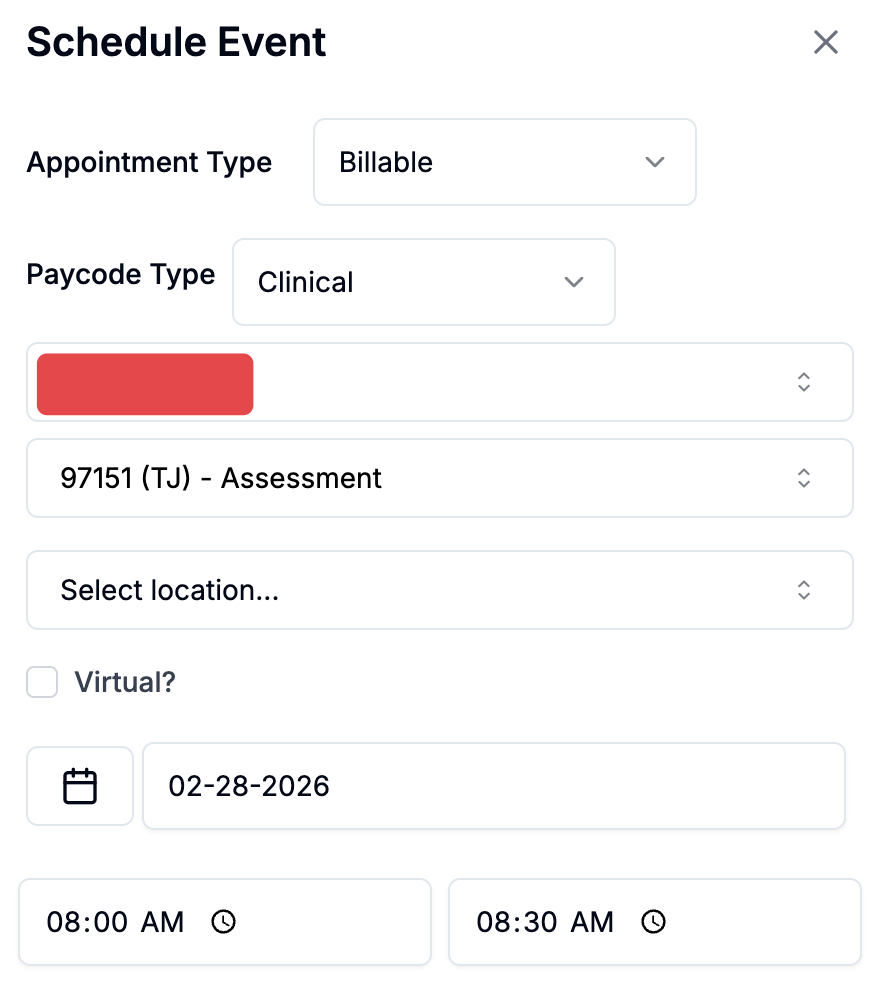
5. Signing off on a 97151 TJ
To bill for a 97151 TJ, go to the calendar and schedule a 97151 TJ for 30 minutes (represents 2 units, which is the max billable). Start and end the appointment, and edit the note with what you did for the re-assessment.
6. Best Practices for BCBA Practice Owners
Do:
Conduct your assessment over as many days as clinically needed.
Document everything within Alpaca’s 97151 assessment template.
Sign one assessment session once the report is finalized.
Follow the 6-month cadence to avoid lapses in authorization.
Don’t:
Don’t sign multiple 97151 sessions.
Don’t try to break the assessment into “parts” for billing purposes.
Don’t sign a TJ code unless it is the 6-month reassessment window.