Adding your own clients and siblings in Alpaca
Last updated: August 1, 2026
Adding your own families to Alpaca
There are two ways a child gets added to your clinic, and which one you use depends on whether the family already has an Alpaca account.
This guide covers families who come to you directly — walk-ins, pediatrician referrals, word-of-mouth, or siblings of children you already serve. These families skip Alpaca's matching process entirely.
Situation | What to use |
|---|---|
A brand-new family coming directly to your clinic | Your clinic's Intake Form URL |
A sibling of a child you already serve | Parent Portal → Add a Child |
Option 1 — A new family of your own
Every clinic has its own intake form link. Families who complete it land directly on your caseload.
Find your link
In the left sidebar, go to Referrals.
Stay on the Referral Patients tab (it opens there by default).
At the top, find Intake Form URL.
Click the copy icon.
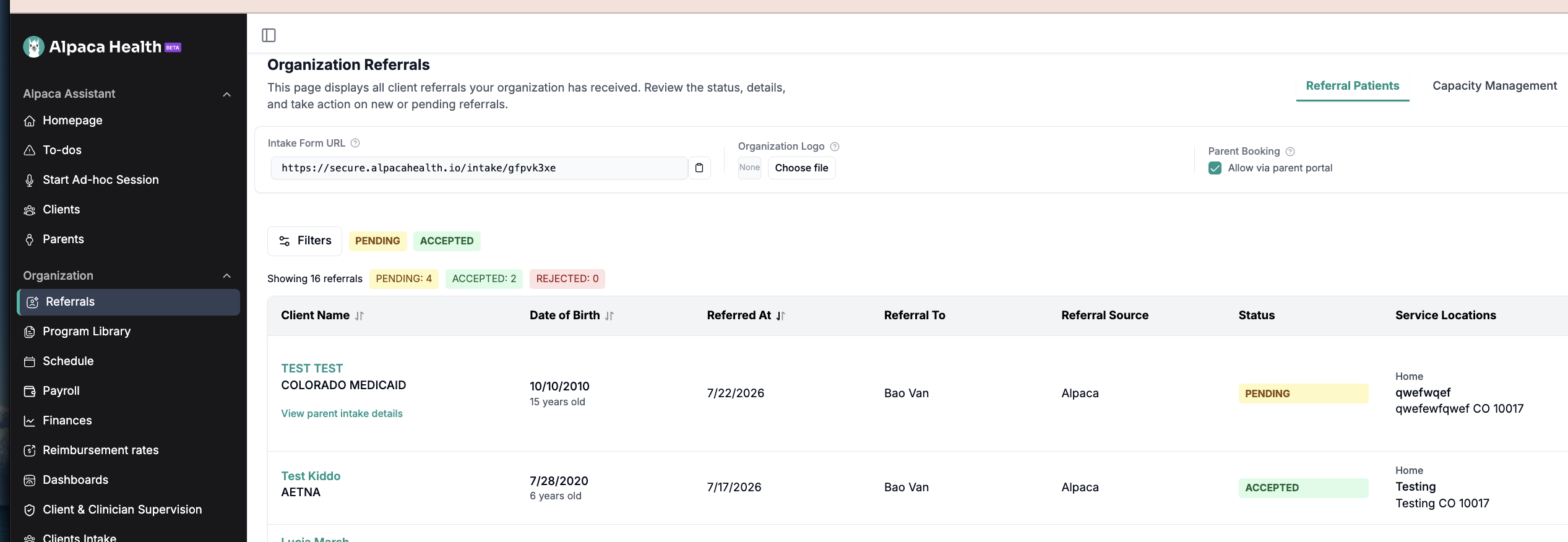
Share it
Send it however you normally reach families — email, text, your website, or a QR code on a printed handout. It's the same link every time, so save it once and reuse it.
What the family sees
A short, HIPAA-compliant form headed "Get Started with ABA Therapy!" asking for parent name, email, phone, and home zip code. After they submit, they're guided through the rest of intake: insurance details, diagnosis paperwork, and documents.
What happens next
The child appears in your Clients tab, assigned to your clinic. There's no referral to accept and no waiting — they're yours the moment the form is submitted.
Option 2 — A sibling of a family you already serve
Don't send your intake form link to a parent who already has an Alpaca account. They'll hit a screen saying "It looks like you already have an account" and get stuck.
Siblings are added by the parent, from their own Parent Portal.
What to tell the parent
Sign in to the Alpaca Parent Portal.
At the top of the screen, find the row of tabs with your children's names.
Click the + button at the end of that row.
Complete the Add a Child steps: personal information, diagnosis details (if applicable), and insurance.
Review the summary and confirm.
The sibling appears in your Clients tab under the same family, using the insurance already on file.
Good to know
A parent can add up to 5 children this way. If a family needs more, contact Alpaca support.
The sibling inherits the family's existing insurance, so the parent doesn't re-enter the card.
What not to do
Don't send your own families to Alpaca's general intake form.
That form is for families who come to Alpaca first and need to be matched with a provider. If one of your own families goes through it, they enter the matching queue and become a referral — which then has to be routed to you and accepted before they reach your caseload.
Until that referral is accepted, the family is not on your caseload. They'll show on your Referrals page as "Pending referral decision" and won't appear in your Clients list, your schedule, or your session notes.
If this has already happened, contact Alpaca support and we'll correct it.
Troubleshooting
I can't find the Intake Form URL on my Referrals page. Contact Alpaca support and we'll get the link set up for your clinic.
The parent says the intake form tells them they already have an account. That's expected — they do. Use Option 2 (Parent Portal → Add a Child) instead.
I filled out the form for a family I already serve and now they're stuck in Referrals. Contact Alpaca support. Don't create a second record for the child.
A family filled out the form but I don't see them in Clients. Check that they completed the whole form, not just the first screen. If they stopped partway, their intake is still in progress. Contact support if it's been more than a day.