Start a treatment plan or reassessment from a hand-written plan
Last updated: October 12, 2026
Use a previous BCBA-written plan to fill matching blank sections in a new treatment plan or reassessment. Existing text stays in place. You review anything copied before signing.
Your clinic must have this workflow enabled. PDF is supported; Word is available where Word uploads are enabled.
Create a treatment plan
- Open the client’s Treatment Plans tab. Select Create New Report → Treatment Plan.
- In Clinical Profile, check Also reuse an earlier plan.
- Choose an existing plan, or select Upload an earlier plan (PDF or Word). Upload your file with Upload and use. If Word is unavailable, the upload option says PDF.
- For an existing source, select Copy sections and continue.
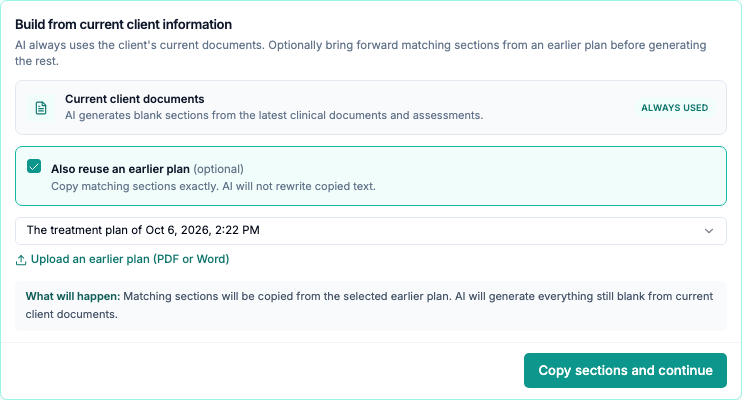
Alpaca copies matching blank sections. Current client documents still inform generation of the remaining sections.
Create a reassessment
- Open or create the client’s reassessment.
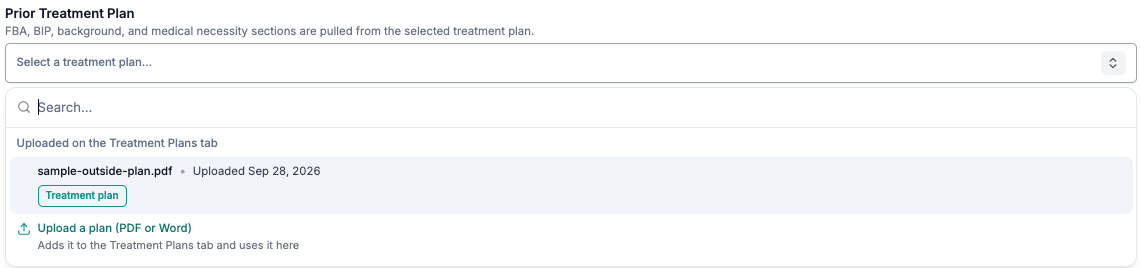
- In step 1, Clinical Information, open Prior Treatment Plan.
- Choose an uploaded plan and confirm Use uploaded plan. To add a file, select Upload a plan (PDF or Word), then Upload and use.
- Keep working while Alpaca reads the file. Matching blank sections fill when reading finishes.
Switching back to an Alpaca plan removes untouched upload text. Sections you edited or marked Looks right stay.
Review the copied text
Copied sections have a tinted background and a source link. Open the source, compare the text, then select Looks right or edit the section. The to check count decreases as you review.

Treatment-plan signing stays blocked until copied sections are reviewed. Review reassessment sections before signing too; its guided signing screen shows remaining checks.
Before you finish
- Check anything missing. Not every paragraph maps to a field. Enter medications and allergies manually. Uploaded plans do not update client profile fields or fill structured FBA/BIP tables in this version.
- Write for the current period. A reassessment does not copy old findings, recommendations, clinical observation, crisis, or discharge sections.
- Review suggested goals. With an upload as the only prior plan, Generate Goals can suggest skill, parent-training, and behavior-reduction goals. It does not create a BIP or replacement-behavior goals.
- Check long documents. PDF reading stops at 200 pages.
Need help?
- Controls missing? Ask your Alpaca contact whether the workflow is available for your clinic.
- Reading failed? Select Try again if offered, or choose another source.
- Fields stayed blank? Existing text is kept. Review the source and fill missing information yourself.
Reading an upload sends its content to Gemini, with a configured fallback such as OpenAI. AI tracing may store inputs and outputs in LangSmith. Extracted text and review state are saved in Alpaca.