Where do I find my client's address?
Last updated: July 28, 2026
Short answer
The client's address is not included in the appointment notification email — those emails only show the client name, date, and time. To find the address, open the appointment on your schedule in Alpaca, and the address appears right in the appointment details.
Why the address isn't in the email
Appointment and cancellation notifications are lightweight reminders and, to protect client privacy (PHI), they intentionally leave out the home address and other sensitive details. The address is stored securely inside the platform instead.
How to find the client's address
Log in to Alpaca at secure.alpacahealth.io.
Go to your schedule/calendar and click the appointment.
In the appointment details card that opens, the address is shown next to the map-pin icon (📍), labeled with the location type — for example:
Home - 312 Main St, City, ST 00000.
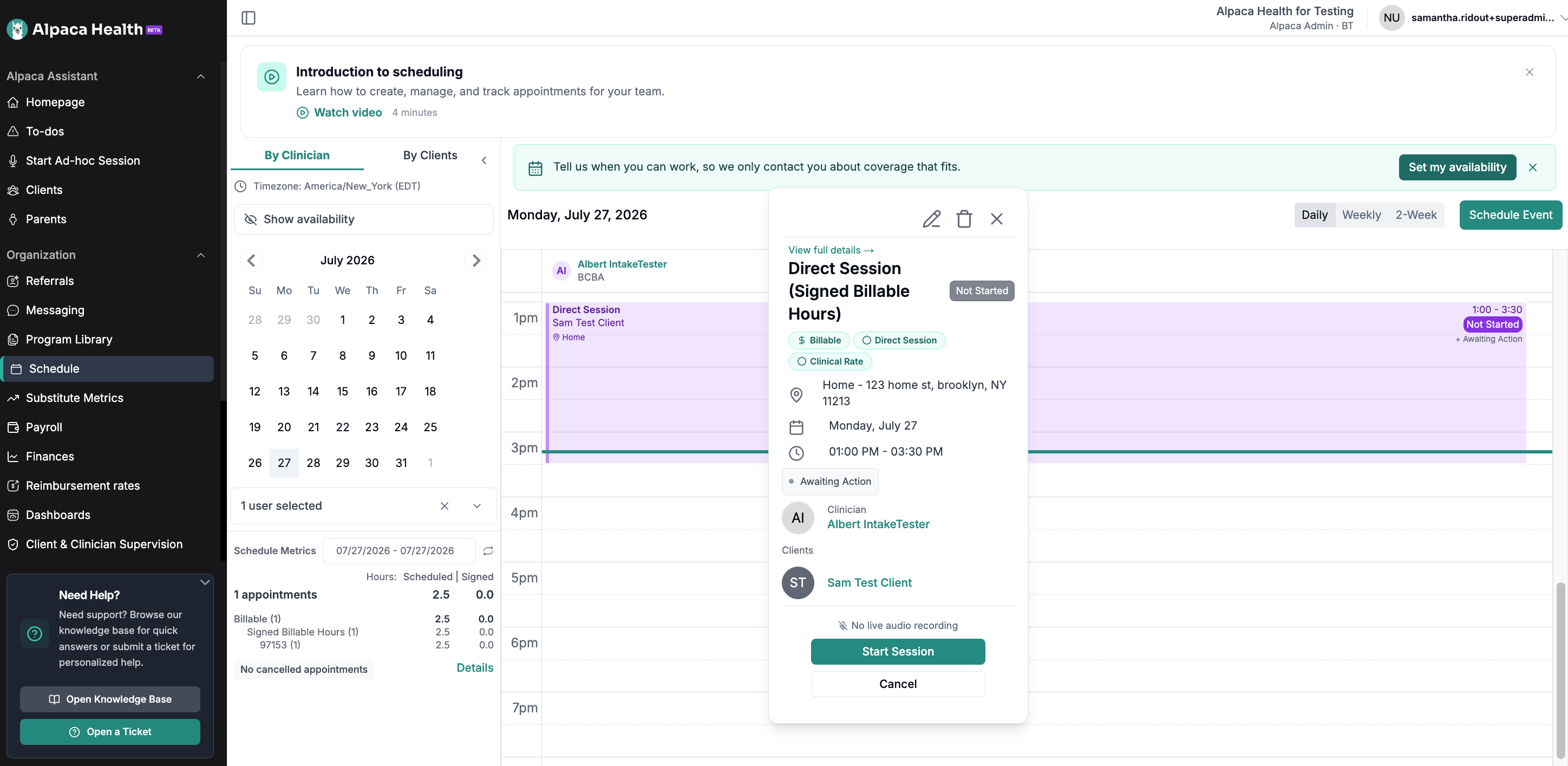
That's it — you don't need to open the full client profile. (If you want more, the "View full details →" link at the top of the card opens the complete appointment/client view.)
Still can't see it?
No address shown on the appointment: it may not have been entered yet — ask your BCBA or org admin to add it to the client record.
You don't see the appointment details: contact your org admin to confirm your access.
Still stuck? Reach out to your organization's Alpaca support address (shown in your appointment emails) or support@alpacahealth.io.