Shared data collection - Live board
Last updated: September 10, 2026
When two of you work with the same client at the same time, you can record into one shared set of data instead of two separate ones. You each still write and sign your own session note, and your time is still billed under your own session and CPT code.
The choice you'll see
Start a session as usual. If someone is already recording for that client, Alpaca asks how you want to record before you begin.
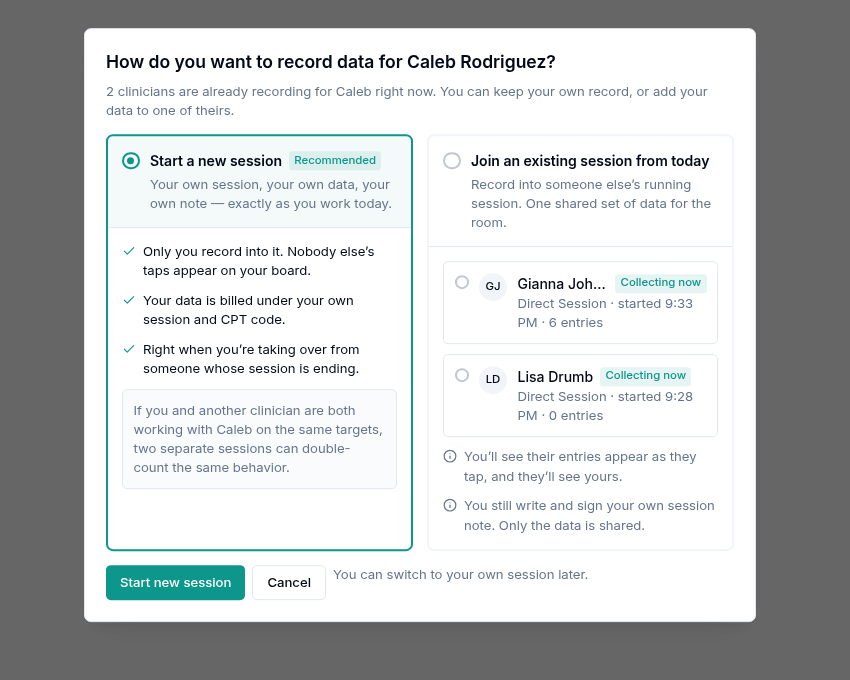
The prompt lists everyone recording for that client right now, when they started, and how many entries they have so far. Start a new session is preselected — joining is always deliberate, never automatic.
Start a new session
Your own session, your own data, your own note. Nobody else's taps appear on your board.
Choose this when you're taking over from a clinician whose session is ending. An overlapping appointment is a handover, not a shared room.
Join an existing session
Your entries and theirs go into one set of data for the room. Pick the person whose session you're joining, then Join session. You'll see their entries appear as they tap, and they'll see yours.
Why this matters clinically. If you and a colleague both work the same targets in two separate sessions, the same behavior gets counted twice. One shared set of data is what keeps the client's record honest.
Supervision: a BCBA sits in
You're mid-session with the client. Your supervising BCBA arrives to observe protocol fidelity and starts their own supervision session (97155) for the same client. They join your board.
In practice the BCBA usually samples different targets than you — they're checking a protocol, not running the whole session. Their entries land on the same board as yours, attributed to them, so the record shows who measured what.
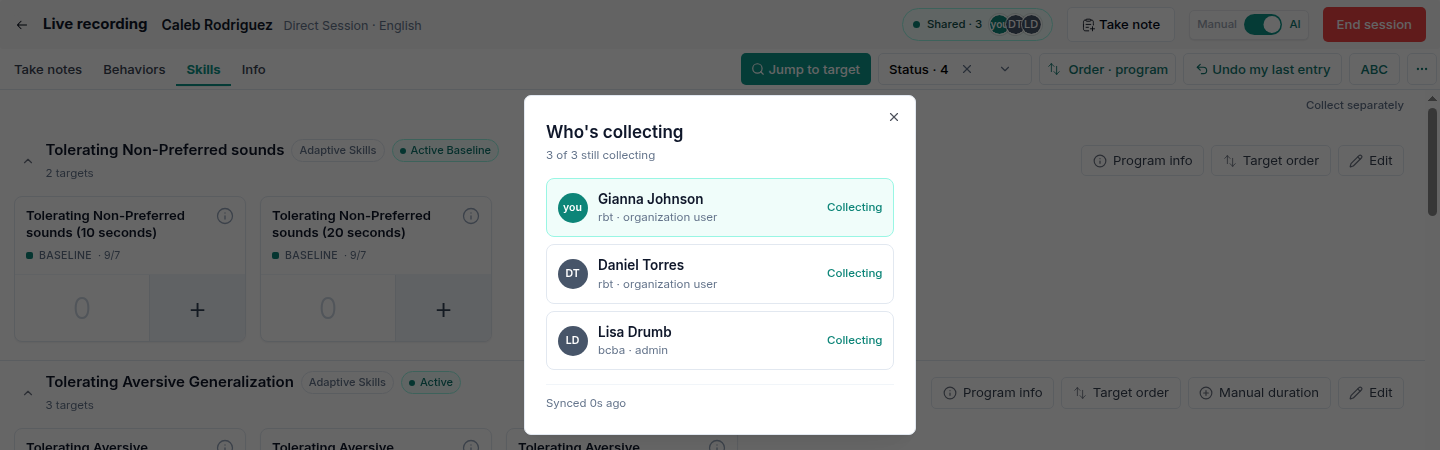
Roles appear next to each name, so a supervising bcba is never mistaken for another technician.
Two technicians, one client
Some clients need two technicians at once — for safety, or for a protocol that requires two adults. Both of you run therapy, both collect, and both bill your own session.
Here the risk runs the other way: you're likely to reach for the same target. The board shows you who has already recorded on each one.
Reading the board
The header carries a Shared · N badge with everyone's initials. Each target card shows who has recorded on it this session, and the running total combines everyone's entries.
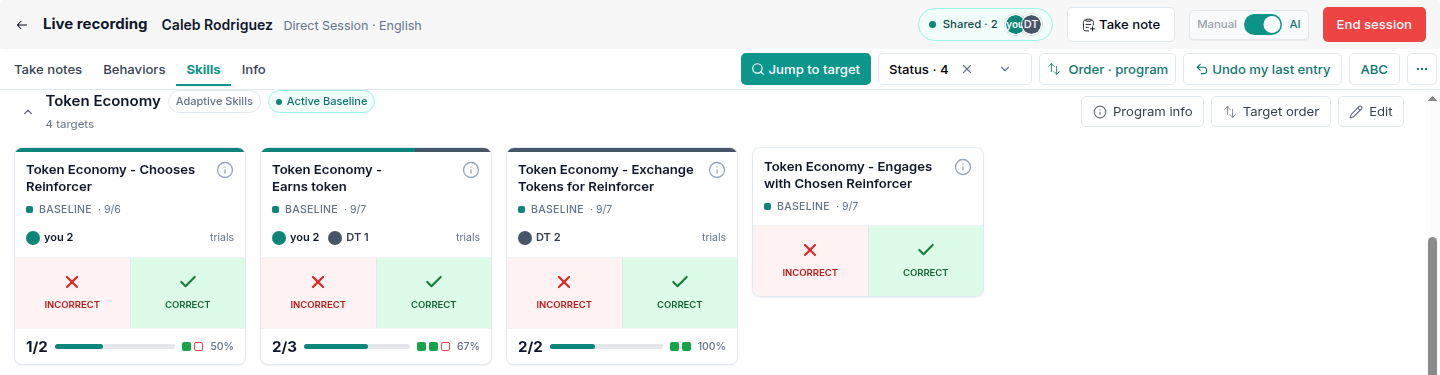
On the card | Means |
|---|---|
you | Entries you recorded, on any target, in this session |
Initials (e.g. | A colleague's entries — open the entry list for the full name |
In the example above, Earns token carries entries from both people. The 2/3 total is the two of you combined, not two separate tallies.
Color is never the only signal. The count is labelled either way, so the card reads correctly in bright rooms and for colorblind clinicians.
Who's in the room
Tap the Shared · N badge to see everyone on the board, their role, and whether they're still collecting.
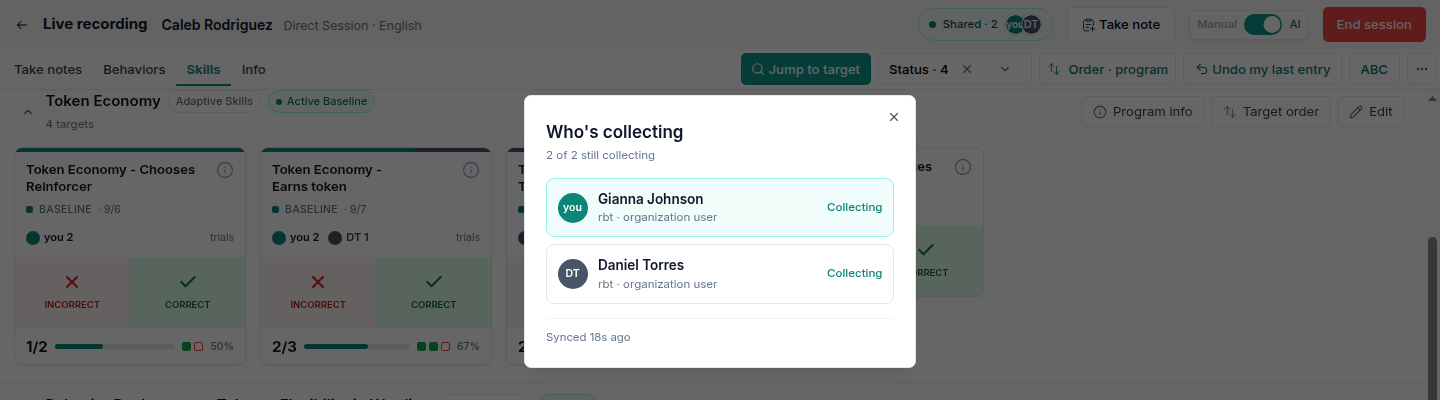
Entries from a colleague arrive within a few seconds, not instantly. Synced 18s ago tells you how current your board is.
Checking who recorded what
Open Edit on any program for the full list of entries. It groups by target, newest first, and names the person and the time behind every single entry.

This is where you check a number that looks wrong, before the note is signed.
Undo only ever removes your own entry
On a shared board the button reads Undo my last entry, and that is exactly what it does. It removes the last thing you recorded. It cannot reach a colleague's entry, on any target, at any point in the session.
To correct a colleague's entry you need the entry list above, and permission to edit other people's data. Corrections stay attributed, so the record shows both who recorded the entry and who changed it.
Leaving a shared board
Choose Collect separately at the top of the board to stop sharing. Alpaca tells you exactly what happens to the entries you've already made.
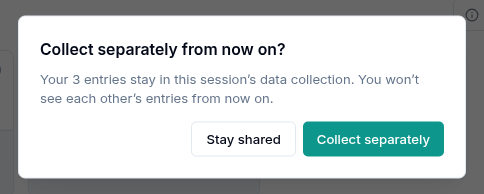
Nothing you already recorded is lost or withdrawn. From that point on you each have your own board.
What's shared, and what stays yours
Shared or yours | |
|---|---|
Collected data | Shared — one set for the room, every entry attributed to whoever recorded it |
Your session note | Yours. You write it, you sign it, and nobody else edits it |
Your billing | Yours. Your time bills under your own session and CPT code |
Undo | Yours. It only removes entries you made |
Ending the session | Yours. Ending your note doesn't end anyone else's — colleagues keep collecting, and your entries stay in the shared data |
If you don't see the option
Shared data collection is turned on per organization. If you start a session for a client a colleague is already recording for and see no prompt, it isn't switched on for your clinic yet — ask an administrator to contact Alpaca.
The prompt also only appears for sessions started today, and only for clients on your caseload.